
Dashboard and CLI
Output and screenshots here come from the dashboard’s demo daemon, whose made-up machine is the example config.
Dashboard
Section titled “Dashboard”runnerd serve serves it on 127.0.0.1:7477; --web <address> picks another loopback address, --web off serves none. Each browser signs in once, through a one-time link the daemon keeps in $XDG_RUNTIME_DIR/runnerd.web:
runnerctl web# without runnerctlxdg-open "$(head -n 1 "$XDG_RUNTIME_DIR/runnerd.web")"A browser stays signed in for 30 days after its last visit, across restarts of runnerd and of the browser. The session secret is in dashboard-session beside the job history (~/.local/state/runnerd/), readable by you only. The directory must be one other users cannot write. To sign every browser out, this one included, and end every link and QR code made before:
runnerctl web --sign-out-allPages update as things happen, over one server-sent event stream per page. Memory and CPU are sampled every 2 s, so a shorter peak does not show; the dashboard calls them sampled peaks.
Any local user can reach the port, so every page needs the session cookie a login link sets, and writes such as a pause also need the dashboard’s own Origin, so another site the browser has open cannot send them. A link to a page from elsewhere, such as GitHub, a notification or the browser’s history, opens it signed in. The pages load nothing from elsewhere: the Datastar script and the font are in the binary.
From another device
Section titled “From another device”The dashboard listens on loopback only. To open it on a phone or another computer, put a proxy that serves HTTPS in front of it, such as tailscale serve, which reaches every device on your tailnet:
tailscale serve --https 8443 http://127.0.0.1:7477Then add the proxy’s address to [web] origins in runnerd.toml and restart runnerd, so writes from its pages pass the Origin check:
[web]origins = ["https://forge.tail0b5e.ts.net:8443"]Now runnerctl web prints a one-time link for each address in [web] origins too, after opening the dashboard here. To sign a phone in, scan a QR code: open Config in the dashboard on this computer and choose Show a QR code under Add a device, or print one in the terminal:
runnerctl web --qrIf you always reach the dashboard through the proxy, even on this computer, name it in open too, and runnerctl web opens it there instead of on 127.0.0.1, still printing the loopback link. runnerctl web --local opens the loopback address for one run:
[web]origins = ["https://forge.tail0b5e.ts.net:8443"]open = "https://forge.tail0b5e.ts.net:8443"A QR code works once, within 5 minutes, and only on the address it shows; each one is new. A link from runnerctl web works once, and the daemon writes a new one in its place. Each address has its own link, so using one leaves the others working. --base <origin> prints the link for a proxy not in [web] origins, which can then only read. Behind a proxy that says it took the request over HTTPS (X-Forwarded-Proto, which tailscale serve sends), the session cookie is Secure. Anyone who can reach the proxy sees the sign-in page and nothing else without a link.
runnerd does not trust Tailscale’s identity headers such as Tailscale-User-Login: any local user could send them straight to 127.0.0.1:7477.
Install it as an app
Section titled “Install it as an app”Chromium-based browsers (Chrome, Edge, Brave) install the dashboard as an app with its own window: on the desktop, the install button in the address bar or Install in the menu; on Android, Add to home screen in Chrome’s menu, then Install. Both work through the HTTPS proxy and on http://127.0.0.1:7477, which browsers treat as secure. Each address installs as its own app. The app is the same live pages and needs runnerd running; nothing is kept for offline use. Firefox installs web apps on Windows only, so on Linux it stays a tab.
Views of the same thing are linked. On the overview, pointing at, focusing or tapping a slot’s block, card, running job or repository lights up the others and says above the bar what the block holds, free space included; a slot’s block opens its job. On a job, a step marks its stretch of the memory and CPU charts. On the history, a day, pointed at or stepped to with the arrow keys, is marked on all three charts and its numbers replace the 30 days’ in the headline.
Overview
Section titled “Overview”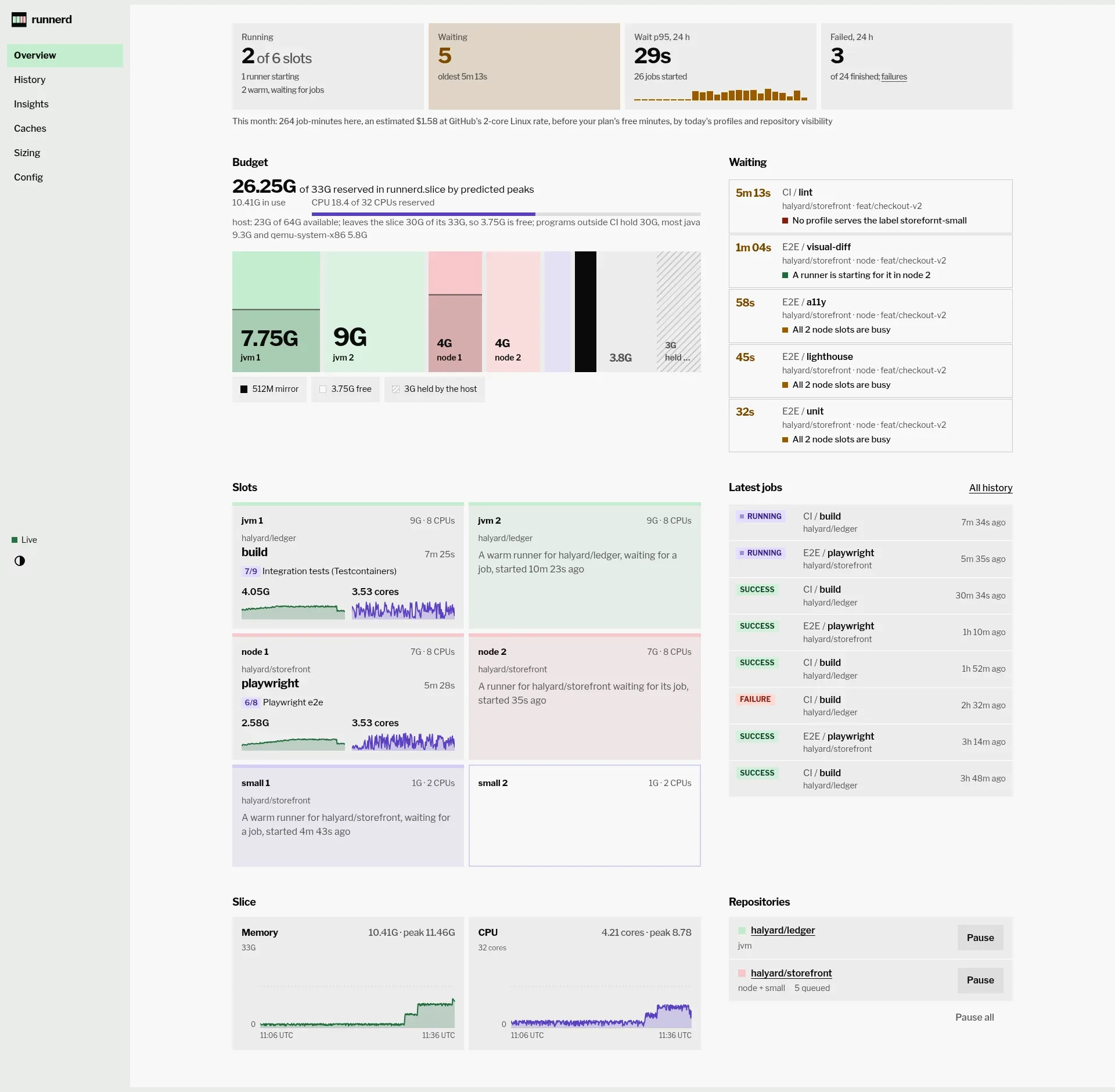
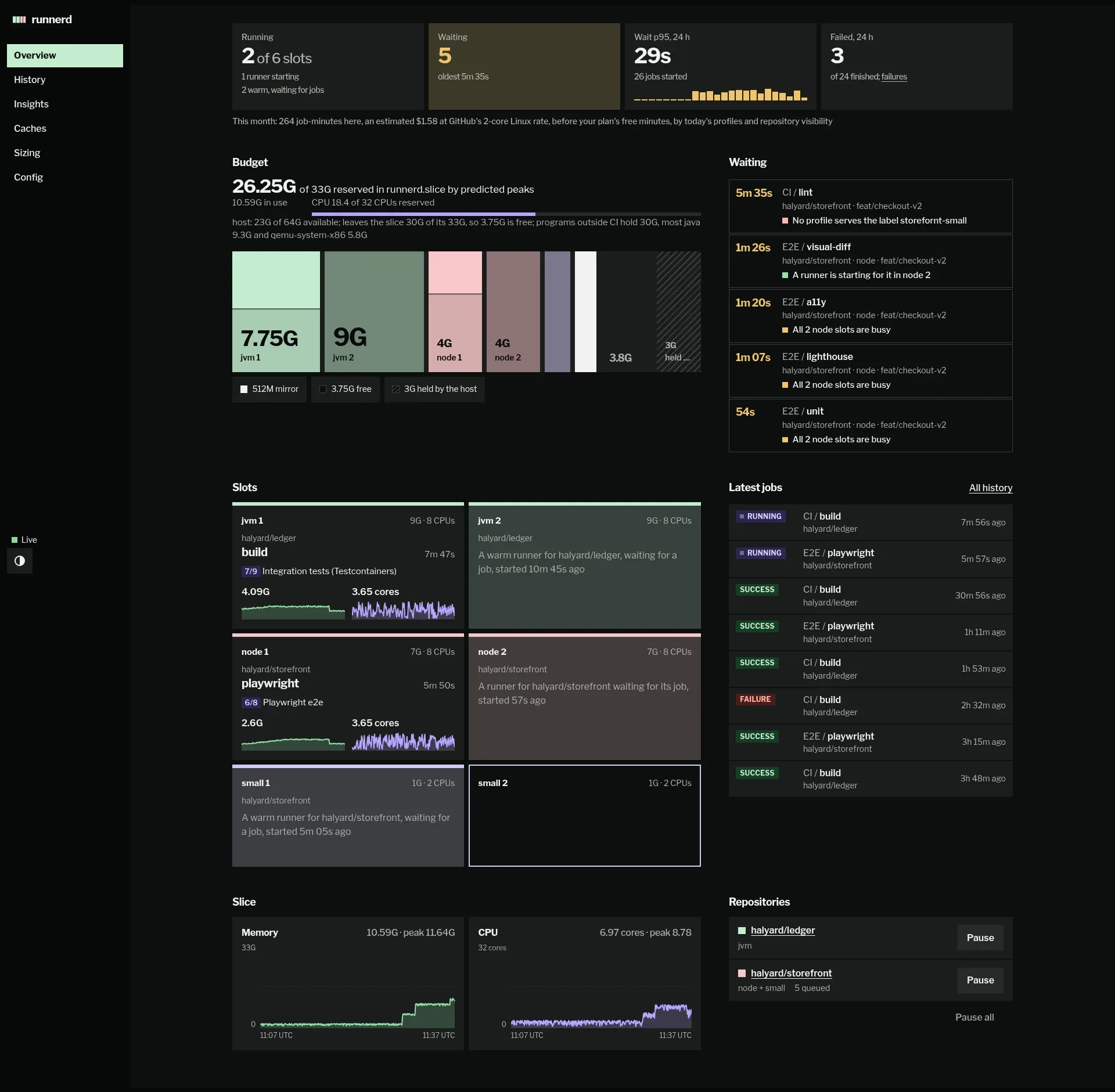
The page opens with four figures: slots running, jobs waiting and how long the oldest has, the p95 wait of every job that started in the 24 hours up to now, with the longest wait of each of those hours, and the failures among the jobs that ended in them. That figure turns red only when a runner failed its job, lost with it or killed for memory at its cap, and says how many; a job’s own failing tests leave it plain. Under them, Waiting lists each queued job, oldest first, with how long it has waited and why runnerd has not started it: no profile serves its labels, its repository is paused, its runners failed to register, start or take a job and runnerd retries later, a runner is starting for it, its profile is reseeding or pulling its image, every slot of its profile is busy, its runner needs more memory or CPU than the budget has left, an older job waiting for CPU goes first, or an older job’s runner starts first. The reason is the scheduler’s own, worked out again each time the status changes.
When the host’s memory leaves the slice less than MemoryMax does, the bar’s free part is what the host leaves, and a hatched part after it is held by the host. While measured admission holds the slice past 90% of MemoryMax, or the host stalls short of memory, nothing is free: all the room past the runners is hatched and named for why it is closed. Under CPU admission the line above the budget bar adds the CPU the runners reserve of the budget, and says when a job waits for CPU. Below the slots: the latest jobs, pause and resume per repository or all at once, and the slice over the last half hour. A pause lasts until a resume, across restarts. On a phone the pages are a bar along the bottom edge.
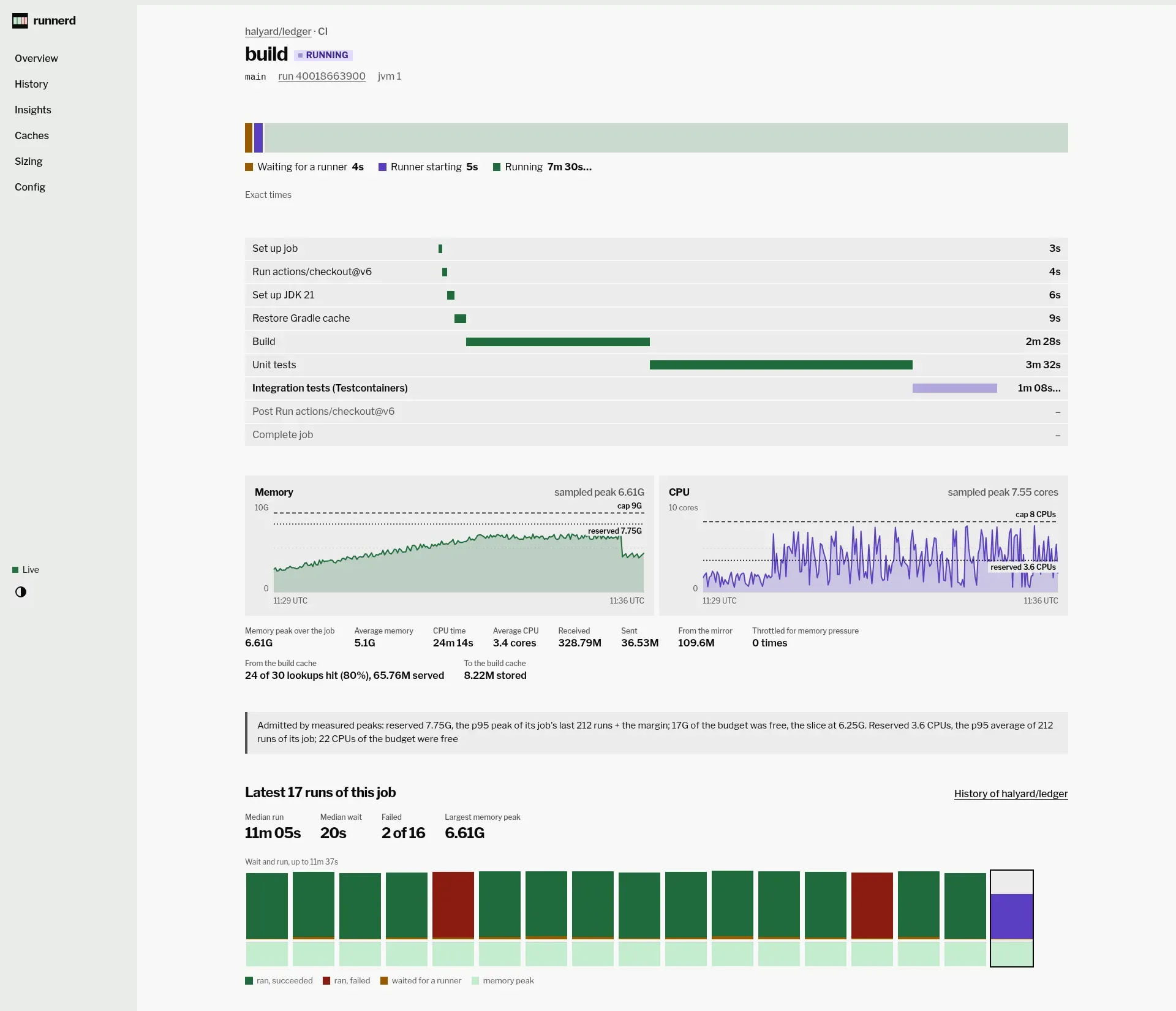
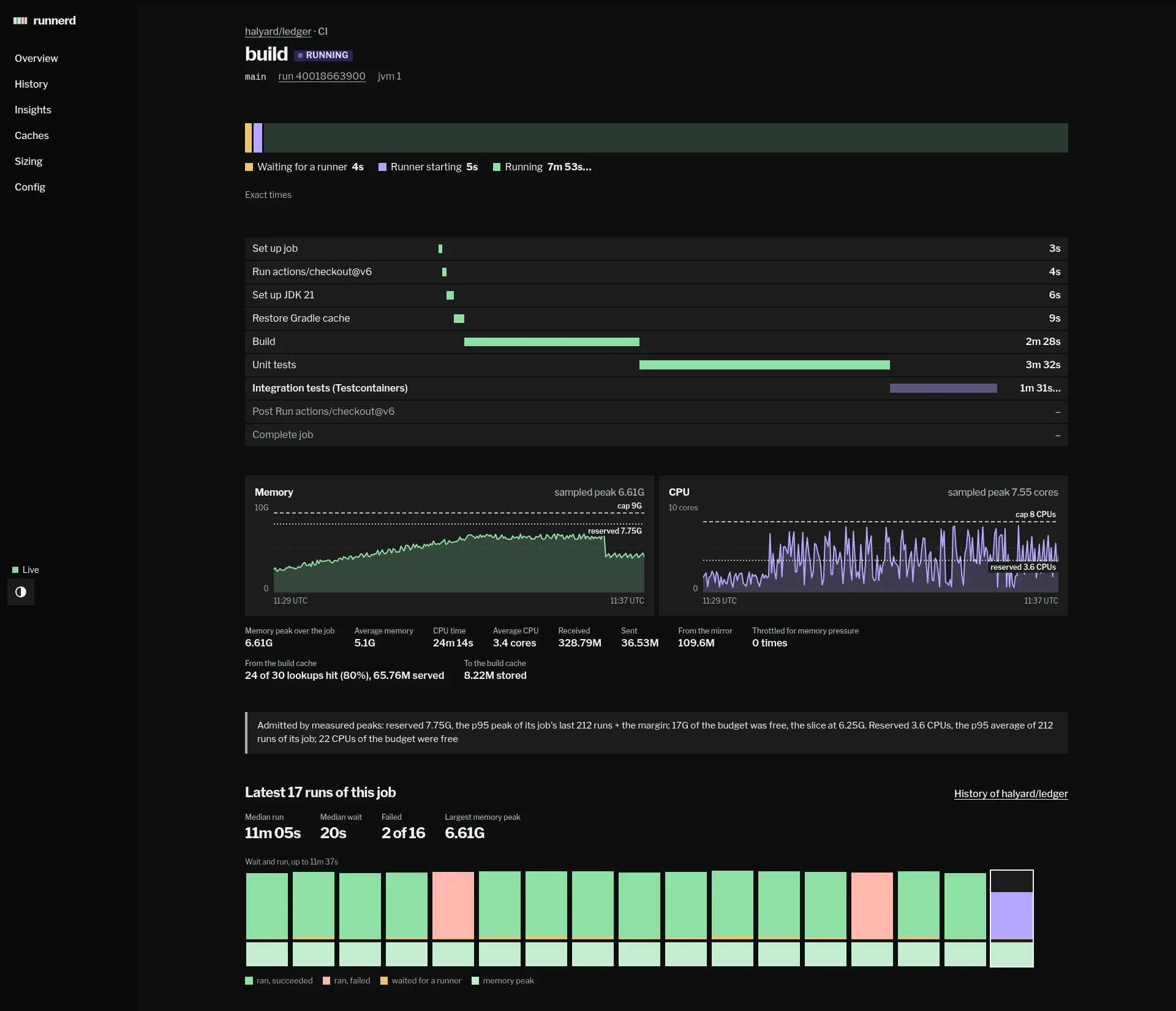
Below the steps: CPU and memory against the container’s caps, with a second line for what admission reserved when that was less (reserved 7.75G under cap 9G); the same job’s latest 30 runs (same repository, workflow and name), each a column of its wait and run time in its outcome’s colour over its memory peak, with the median run and wait; and the log. A failed job kept as a record shows the runnerctl shell command that opens a shell in it, with a copy button.
History
Section titled “History”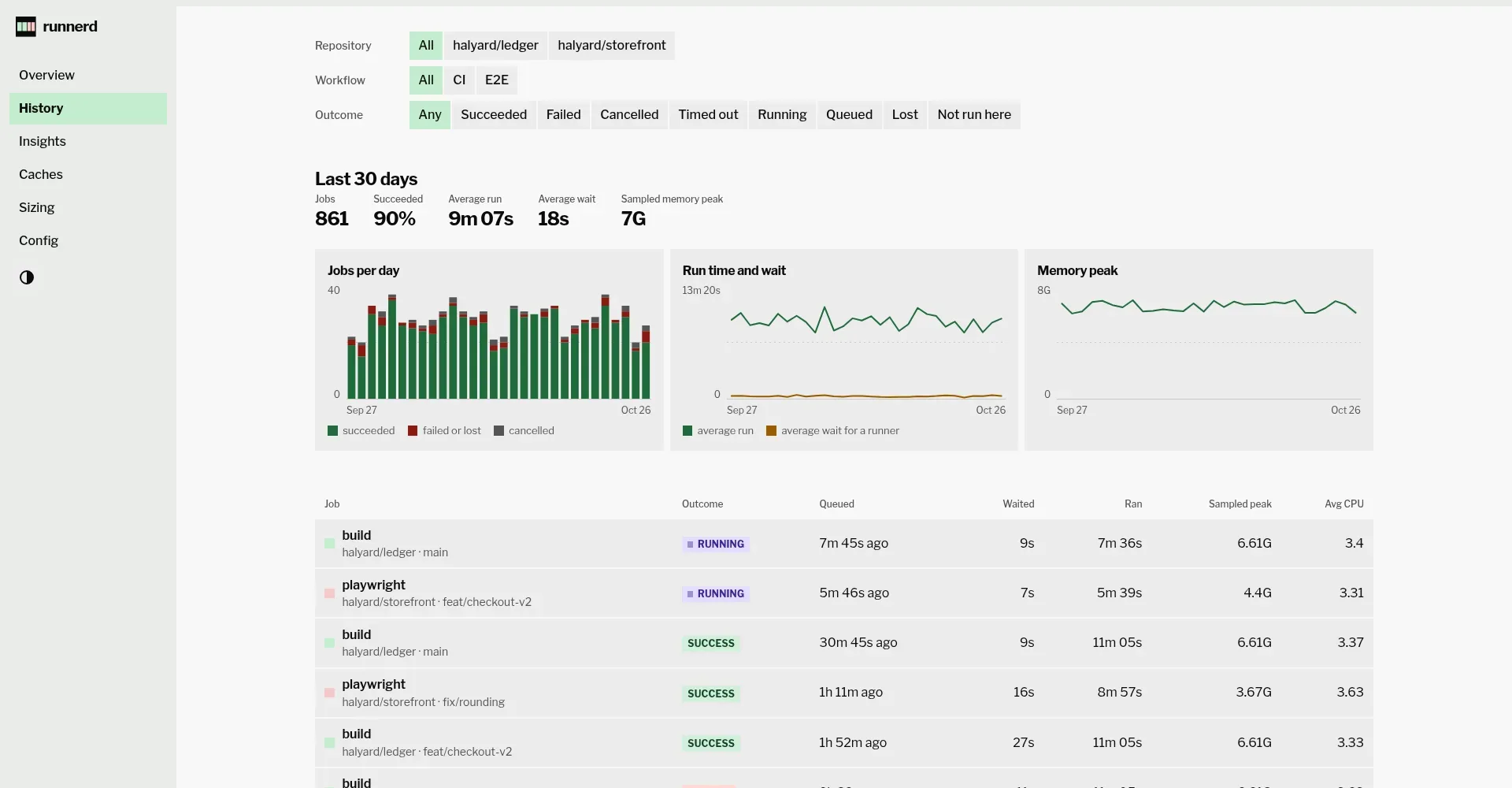
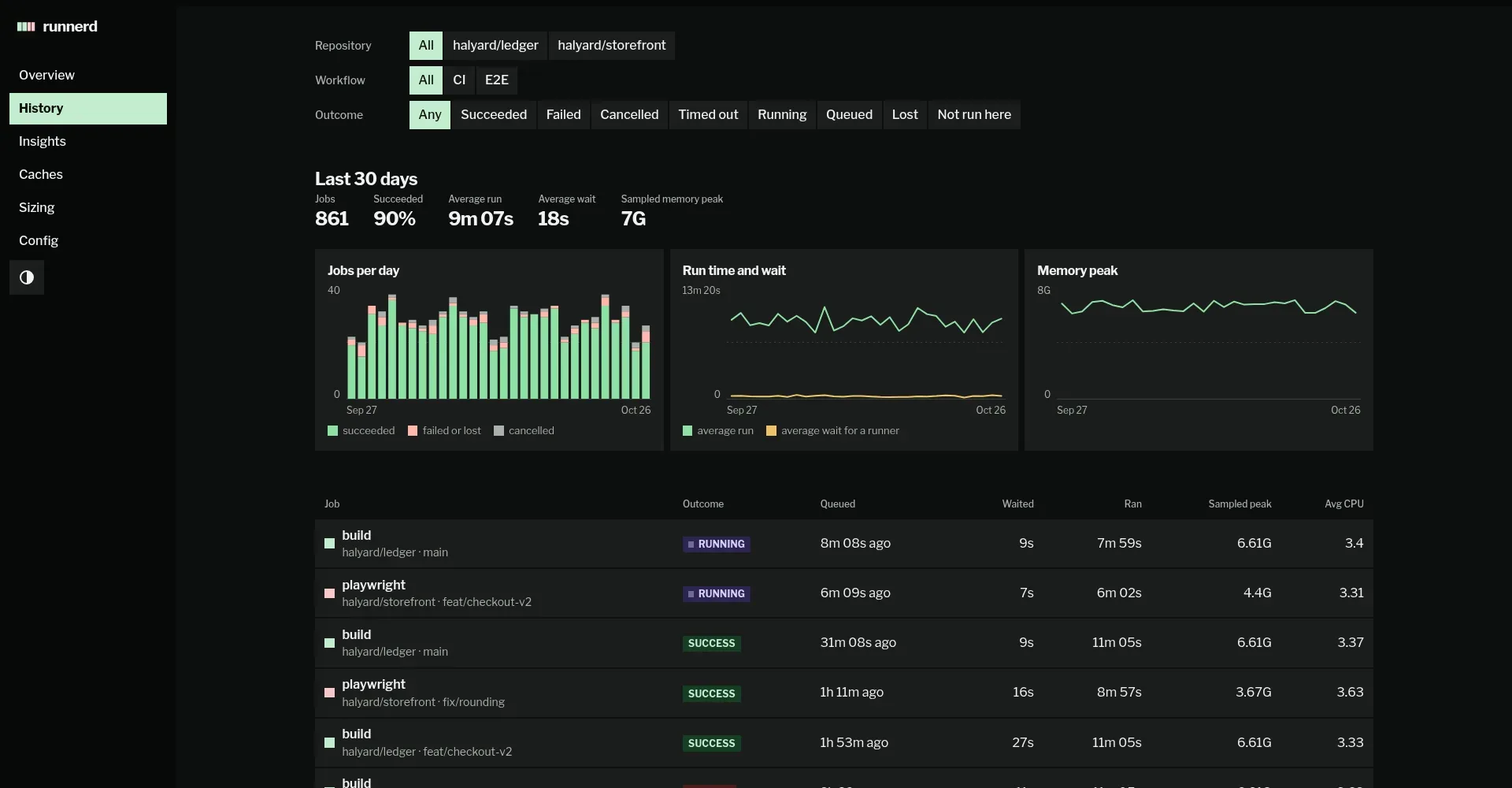
Above the charts, links filter by repository, workflow and outcome; each keeps the others, so a filtered page can be bookmarked. Below the charts: every job that matches. The charts count every workflow and outcome of the repository.
Insights, Caches, Sizing and Config
Section titled “Insights, Caches, Sizing and Config”| Page | Shows |
|---|---|
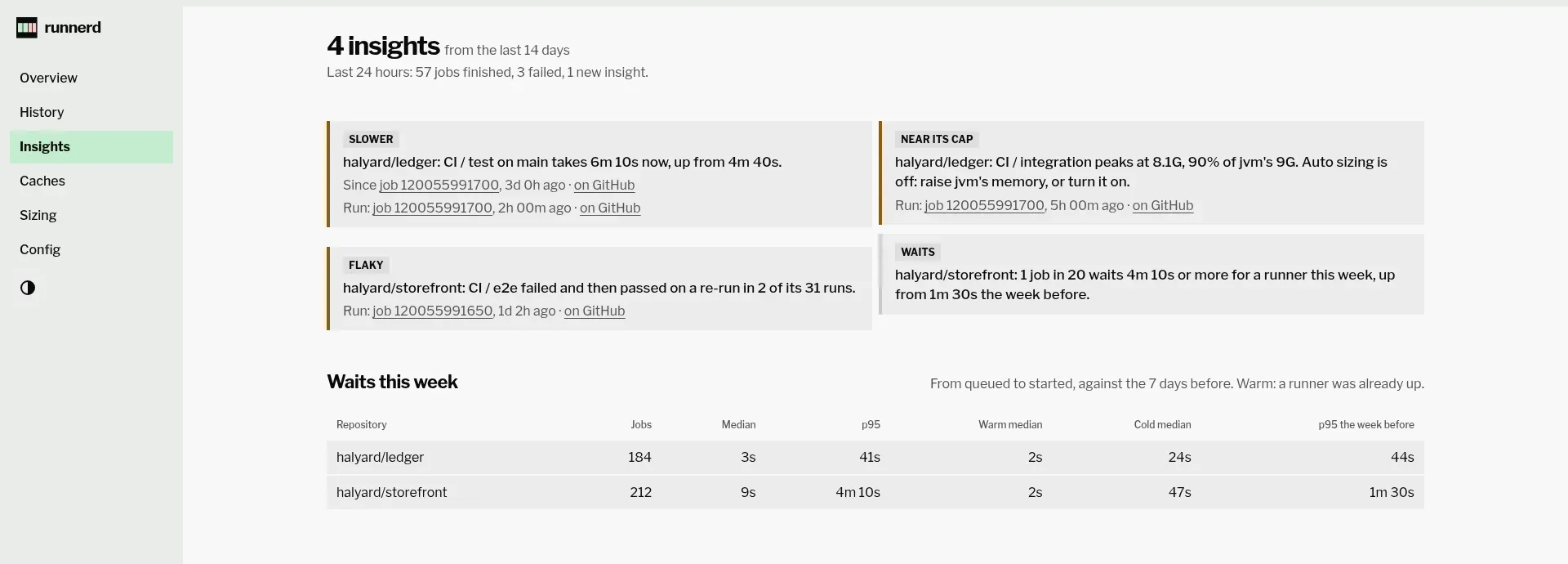
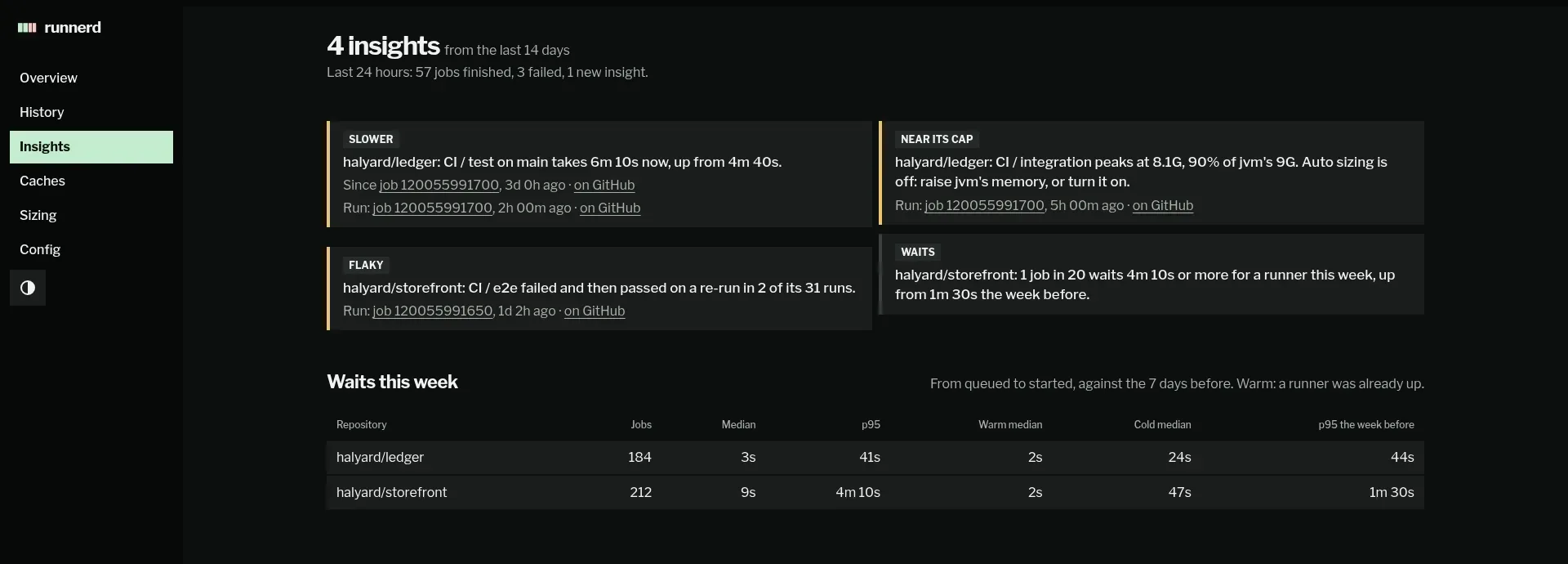
| Insights | a card per insight, warnings first, with links to the runs in the history and on GitHub; the last 24 hours in a line; each repository’s waits this week against the week before, warm and cold apart |
| Caches | each volume, its bound and its size over 30 days; reseed a snapshot or empty a cache; the records of failed jobs, removed one at a time or all at once |
| Sizing | per profile, its jobs’ memory peaks against its cap, their waits and how busy its slots were, the advice, and a row per job; a button opens the advice in the config editor, unsaved; whether auto sizing is on and, per profile, what its next look changes or until when a recent change holds it, or why no look changes anything, such as a hand edit runnerd does not run with yet; the changes it made, with a link that opens the last one undone in the editor |
| Config | runnerd.toml in an editor that checks it as you type by the rule its admission sets, on a bar against MemoryMax: under caps every slot at its cap, a block per profile; under measured one runner of the largest profile and the mirror. It saves and reloads only when it fits; the doctor’s checks |
runnerctl
Section titled “runnerctl”It talks to the socket (--socket picks another), prints aligned text, coloured on a terminal unless NO_COLOR is set, and with --json prints the API’s response unchanged.
$ runnerctl statusrunnerd 0.0.20  26.25G of 33G reserved in runnerd.slice by predicted peaks; CPU 18.4 of 32 CPUs reserved; host: 23G of 64G available; leaves the slice 30G of its 33G, so 3.75G is free; programs outside CI hold 30G, most java 9.3G and qemu-system-x86 5.8G
PROFILE  SLOT  STATE     REPOSITORY          RUNNER                                      UPjvm         1  running   halyard/ledger      runnerd-3f9a-forge-jvm-1-1792899841     7m 23sjvm         2  warm      halyard/ledger      runnerd-3f9a-forge-jvm-2-1792899668    10m 16snode        1  running   halyard/storefront  runnerd-3f9a-forge-node-1-1792899959    5m 25snode        2  starting  halyard/storefront  runnerd-3f9a-forge-node-2-1792900256       28ssmall       1  warm      halyard/storefront  runnerd-3f9a-forge-small-1-1792900008   4m 36ssmall       2  idle
REPOSITORY          PROFILE  STATE   QUEUED  LABELShalyard/ledger      jvm      active       0  self-hosted,linux,x64,jvmhalyard/storefront  node     active       4  self-hosted,linux,x64,node                    small                 0  storefront-small
JOB REPOSITORY WORKFLOW / NAME QUEUED WAITS FOR120055991720 halyard/storefront CI / lint 5m 06s ago No profile serves the label storefornt-small120055991710 halyard/storefront · node E2E / visual-diff 57s ago A runner is starting for it in node 2120055991711 halyard/storefront · node E2E / a11y 51s ago All 2 node slots are busy120055991712 halyard/storefront · node E2E / lighthouse 38s ago All 2 node slots are busy120055991713 halyard/storefront · node E2E / unit 25s ago All 2 node slots are busy| Command | What it shows or does |
|---|---|
runnerctl status |
the memory budget, and the CPU budget under CPU admission, every slot and its runner, the repositories and their queues |
runnerctl jobs [--repo halyard/ledger] [--failed] [--since 7d] |
jobs newest first: result, time waited and run, sampled memory peak; --state, --conclusion, --before, --limit too |
runnerctl job <id> |
one job: timeline, steps with their durations, CPU, memory, network and how often memory pressure throttled it, log size |
runnerctl logs <id> [-f] |
its log; -f follows it until the job’s record is final, waiting out a daemon restart |
runnerctl tui |
a full-screen dashboard in the terminal |
runnerctl watch |
slots, running jobs with their current step and last sample, queued and finished jobs, redrawn as events arrive; one line per event when not on a terminal, one JSON event per line with --json |
runnerctl pause <repo> [--force], resume <repo> |
the repository gets no new runners, also after a restart; refused while it runs a job, naming the job, unless --force cancels the job’s run and removes its runner |
runnerctl pause --all [--force], resume --all |
the same for every repository; refused while any runs a job, pausing none |
runnerctl reseed <profile> |
makes slot 1’s layers the profile’s snapshot once its slots are free, and waits for it (--no-wait) |
runnerctl shell <job> [--step 3] |
a shell in a failed job’s record, in its workspace; exiting removes its container |
runnerctl records, records rm <job> |
the records of failed jobs with their sizes and limits; removes one, or --all, or those --older-than 2d |
runnerctl sizing [--since 7d] |
per profile and per job: percentiles and the largest of the sampled memory and CPU peaks, waits, how busy the slots were, and the advice |
runnerctl sizing apply <profile> [--yes] |
writes a profile’s advised memory and slots into the daemon’s config after showing the change and asking; the daemon checks it against the budget first |
runnerctl sizing undo <profile> [--yes] |
writes back the memory, slots and cpus auto sizing last replaced, the same way; both refuse to write over a config changed since they read it |
runnerctl insights [--days 30], insights --digest |
what the job minutes would have cost on GitHub’s runners, one line per insight, then each repository’s waits this week against the last; or the last 24 hours |
runnerctl notify test [--target phone] |
sends each [notify] target a test message and says what each did; fails unless every one got it |
runnerctl caches [--clean <volume>] |
the cache volumes, their sizes and limits; or empties a slot layer or shared cache no job uses, stopping the runners that wait for one |
runnerctl config show, config check [file] |
the config the daemon runs with; a file checked against the daemon’s budget, as runnerd check-config does |
runnerctl doctor |
the daemon’s host checks, or runnerd doctor run here when the daemon is not running |
runnerctl web |
opens the dashboard with a one-time login link from $XDG_RUNTIME_DIR/runnerd.web, on [web] open if set, and prints one for each other address (--local opens the loopback address, --base <origin> a proxy’s, --no-open prints them all, --qr shows a fresh 5-minute link on each origin as a QR code, --sign-out-all signs every browser out) |
Sizing
Section titled “Sizing”$ runnerctl sizingfrom 30d 0h of history; peaks are sampled every 2 s, so a shorter spike goes unseen: advice sizes for the largest + 15%, at least 1G for page cache, rounded up to 256M, once a profile ran 10 jobs; auto sizing applies it
jvm 9G × 2, 8 CPUs; 400 jobs, slots busy 41%, waited p50 8s p95 35s warm runners took 31 of 40 jobs: waited p50 2s, the others 21s memory p50 5.2G p95 7.4G p99 7.7G max 7.8G cpu p50 3.1 p95 6.9 p99 7.6 max 7.9 keep 9G: its largest peak + 15% is 9G auto sizing 2d 0h ago: memory 10G → 9G, slots 2 runnerctl sizing undo jvm
REPOSITORY JOB RUNS P50 P95 P99 MAX CPU P99 WAIT P95 NEEDS halyard/ledger CI / build 212 3.1G 4.2G 4.5G 4.6G 7.6 30s 5.75G halyard/ledger CI / integration tests 188 5.2G 7.4G 7.7G 7.8G 7.6 35s 9G
node 7G × 2, 8 CPUs; 242 jobs, slots busy 78%, waited p50 12s p95 4m 20s warm runners took 31 of 40 jobs: waited p50 2s, the others 21s memory p50 1.4G p95 1.9G p99 2G max 2.1G cpu p50 3.1 p95 6.9 p99 7.6 max 7.9 lower memory to 3.25G from 7G, its largest peak + 1G for page cache; 4 slots fit in the same 14G
REPOSITORY JOB RUNS P50 P95 P99 MAX CPU P99 WAIT P95 NEEDS halyard/storefront CI / build 236 1.4G 1.9G 2G 2.1G 7.6 4m 20s 3.25G halyard/storefront CI / e2e 6 1.8G 2G 2G 2G 7.6 4m 40s max 2GWith auto sizing on, as here, the first line ends with auto sizing applies it, and each change it made shows under its profile with the command that undoes it. Without it, the first line ends at 10 jobs and a profile the advice would change ends with runnerctl sizing apply node, which shows memory = "7G" -> "3.25G" and slots = 2 -> 4 under [profiles.node] and asks before it writes. Without a terminal to ask on it needs --yes. The rest of the file, comments included, stays as written.
Jobs and watch
Section titled “Jobs and watch”$ runnerctl jobs --repo halyard/ledger --limit 4JOB REPOSITORY WORKFLOW / NAME BRANCH RESULT WAITED RAN MEM PEAK QUEUED120055991700 halyard/ledger CI / build main running 9s 7m 35s 6.61G 7m 44s ago120055991600 halyard/ledger CI / build main success 9s 11m 5s 6.61G 30m 44s ago120055991526 halyard/ledger CI / build feat/checkout-v2 success 27s 11m 5s 6.61G 1h 52m ago120055991489 halyard/ledger CI / build main failure 11s 11m 5s 6.61G 2h 32m agomemory peaks are sampled every 2 s; spikes shorter than that do not showolder jobs: --before 120055991489One frame of runnerctl watch:
runnerd 0.0.20  26.25G of 33G reserved in runnerd.slice by predicted peaks; CPU 18.4 of 32 CPUs reserved; host: 23G of 64G available; leaves the slice 30G of its 33G, so 3.75G is free; programs outside CI hold 30G, most java 9.3G and qemu-system-x86 5.8G  runnerd.slice uses 5.34 cores, 9.57G
SLOT     JOB                                                      STEP                                         RAN   CPU    MEMjvm 1    halyard/ledger CI / build                                Integration tests (Testcontainers) (7/9)  7m 41s  3.14  4.19Gjvm 2    a warm runner for halyard/ledger, waiting for a jobnode 1   halyard/storefront E2E / playwright                      Playwright e2e (6/8)                      5m 44s  3.14  2.67Gnode 2   a runner for halyard/storefront waiting for its jobsmall 1  a warm runner for halyard/storefront, waiting for a jobsmall 2  idle
Queued  halyard/storefront         CI / lint          5m 29s ago  No profile serves the label storefornt-small  halyard/storefront · node  E2E / visual-diff  1m 20s ago  A runner is starting for it in node 2  halyard/storefront · node  E2E / a11y         1m 14s ago  All 2 node slots are busy  halyard/storefront · node  E2E / lighthouse   1m 01s ago  All 2 node slots are busy  halyard/storefront · node  E2E / unit            48s ago  All 2 node slots are busy
Finished  success  halyard/ledger      CI / build        11m 05s  19m 36s ago  success  halyard/storefront  E2E / playwright   8m 57s  1h 01m ago  success  halyard/ledger      CI / build        11m 05s  1h 41m ago  failure  halyard/ledger      CI / build        11m 05s  2h 21m ago  success  halyard/storefront  E2E / playwright   8m 57s  3h 06m ago
CPU and MEM are the last sample, taken every 2 s. Ctrl-C quits.
A pause while a job runs
Section titled “A pause while a job runs”$ runnerctl pause halyard/ledgererror: halyard/ledger runs job 120055991700 on runnerd-3f9a-forge-jvm-1-1792896193`runnerctl pause --force halyard/ledger` cancels its run and removes its runnerEvery repository at once
Section titled “Every repository at once”$ runnerctl pause --allerror: halyard/ledger runs job 120055991700 on runnerd-3f9a-forge-jvm-1-1792896193; halyard/storefront runs job 120055991650 on runnerd-3f9a-forge-node-1-1792896311`runnerctl pause --force --all` cancels their runs and removes their runners$ runnerctl pause --all --forceevery repository paused: it gets no new runnersstopped job 120055991700 on runnerd-3f9a-forge-jvm-1-1792896193stopped job 120055991650 on runnerd-3f9a-forge-node-1-1792896311$ runnerctl resume --allevery repository resumedrunnerctl tui
Section titled “runnerctl tui”The dashboard, for a host you reach over SSH. It shows what the web dashboard does, in the same words:
- a health line: slots running, jobs waiting and the oldest’s wait, and over the last 24 hours the p95 wait with a bar for the longest wait of each hour, and the failures, red only when a runner failed its job, then how many warning insights hold;
- the budget as one bar, a block per slot as wide as its memory cap and filled as far as its job uses it, then the mirror and each seed container, then what is free and, hatched, what no runner may start in: what the host’s memory holds back, or all of it while the slice is held past 90% or the host stalls; its heading adds the CPU budget under CPU admission;
- a card per slot with the job, its step, run time, and memory and CPU sparklines;
- Waiting: each queued job, oldest first, with how long it has waited and why runnerd has not started it;
- the repositories, the latest jobs, and the slice’s memory and CPU up to its MemoryMax and CPUs;
- the history, filtered by outcome, repository and workflow;
- the records of failed jobs, with the command that opens a shell in each;
- sizing: each profile’s peaks and advice, its jobs below, what auto sizing last changed and, while it is on, what its next look changes, how long a recent change holds a profile, or why no look changes anything;
- a job: its timeline and, while it waits, why; the same job’s latest runs as bars of their run times, waits and memory peaks, with the median run and wait; its steps on one time axis, memory and CPU against its container’s caps and what admission reserved, and its log, followed while the job runs.
runnerctl tuirunnerd 0.0.20 1 Overview 2 History 3 Records 4 Sizing ■ live 2/6 running · 5 waiting, oldest 5m 04s · 24 h: wait p95 29s ▁▁▁▁▆▆▆▇▇█▅▆ · 3 failed · 3 insights Budget 26.25G of 33G reserved in runnerd.slice by predicted peaks ████████████▓▓▓▓▓▓▓▓▓ ▓▓▓▓▓▓▓▓▓▓▓▓▓▓▓▓▓▓▓▓▓▓▓▓▓ ███████▓▓▓ ▓▓▓▓▓▓▓▓▓▓ ▓ ▒ ······················ jvm 1 4.43G used jvm 2 9G node 1 node 2 4G Slots 2 running · 5 queued ■ jvm 1 CI / build halyard/ledger 7/9 Integration tes… 7m 16s 4.43G 4.42 ■ jvm 2 a warm runner for halyard/ledger, waiting for a job ■ node 1 E2E / playwright halyard/storefront 6/8 Playwright e2e 5m 19s 2.82G 4.42 ■ node 2 a runner for halyard/storefront waiting for its job ■ small 1 a warm runner for halyard/storefront, waiting for a job ■ small 2 idle Waiting 5 queued, oldest first 5m 04s CI / lint No profile serves the label storefornt-small 55s E2E / visual-diff A runner is starting for it in node 2 49s E2E / a11y All 2 node slots are busy 36s E2E / lighthouse All 2 node slots are busy 23s E2E / unit All 2 node slots are busy Repositories ────────────────────────────────────────────────────────────────────────────────── ■ halyard/ledger jvm 0 queued ■ halyard/storefront node + small 5 queued Latest jobs ─────────────────────────────────────────────────────────────────────────────────── SUCCESS CI / build halyard/ledger 11m 05s 19m 11s ago SUCCESS E2E / playwright halyard/storefront 8m 57s 1h 01m ago SUCCESS CI / build halyard/ledger 11m 05s 1h 41m ago tab pane j/k move enter open p/r pause/resume P/U all R reseed 1-4 views ? help q quit
Scroll to inspect →
Profiles take the dashboard’s colours in the order of their names, mint first and pink second. NO_COLOR leaves bold, dim and block glyphs. On a narrow terminal the slots become one line each and the charts, last on the page, drop out first; what does not fit a line goes as a whole figure or column, and a name that is cut ends in …. A wide terminal adds columns, and the charts take the rows the lists leave.
 runnerd 0.0.20   1 Overview  2 History  3 Records  4 Sizing  job 120055991700                                   ■ live
■ halyard/ledger
CI / build  RUNNING
branch main · run 40018663900 · slot jvm · 1 · capped at 9G and 8 CPUs · waited 9s · ran 7m 34s
░▒██████████████████████████████████████████████████████████████████████████████████████████████████████████████████████
░ Waiting for a runner 4s  ▒ Runner starting 5s  █ Running 7m 34s…
Latest 17 runs                                       median run 11m 05s · wait 20s · 2 of 16 failed · largest peak 6.61G
ran ████████████████▅  waited ▂▆▂▄▅▆▇▆▃▅█▆▅▃▆▂▂  peak ▇▇█▇▇▇▇▇▇▇▇▇▇▇▇▇▇
Steps                                                                                                  7m 34s in 9 steps
Set up job                         █                                                                                 3s
Run actions/checkout@v6            █                                                                                 4s
Set up JDK 21                       █                                                                                6s
Restore Gradle cache                 █                                                                               9s
Build                                 ████████████████████████                                                   2m 28s
Unit tests                                                    ██████████████████████████████████                 3m 32s
Integration tests (Testcontainers)                                                               ▓▓▓▓▓▓▓▓▓▓▓    1m 12s…
Post Run actions/checkout@v6                                                                                          –
Complete job                                                                                                          –
┌ Memory 4.12G ──────────────────────────────────── cap 9G ┐┌ CPU 5.94 cores ────────────────────────────── cap 8 CPUs ┐
│                                                          ││      ▄▁     ▄  ▅       ▂▄  ▂▁ ▄        ▆        ▁        │
│▇▅▅▅▇▆▅▅▆▇▅▇▇▆▇▅▅▆▅▆▆▇▅▅▅▇▅▆▇▅▆▆▅▆▅▆▅▆▆▅▇▇                ││    ▁▄██ █   █ ▁█ ▄▂    ██ ███ █ ▁      █  ▅  ▇ ▁█ ▃  ▅  ▇│
│██████████████████████████████████████████▆▆▇▅▆▇▇▆▆▇▅▆▇▇▆▆││▅█  ████▆█▅▆▅█▄█████▂█▅▇██ ███▁█ █ ▃    █▆▅█ ▇█▂██▄█ ▆█ ██│
│██████████████████████████████████████████████████████████││██▇▃██████████████████████▂█████▂█▂█▃▂▇▇████████████▆█████│
└ sampled peak 6.61G ────────────────────── reserved 7.75G ┘└ sampled peak 7.55 cores ────────────── reserved 3.6 CPUs ┘
mem peak 6.61G  avg 5.1G  cpu peak 7.55  avg 3.4  cpu time 24m 14s  in 328.79M  out 36.53M  mirror 109.6M
 Log ────────────────────────────────────────────────────────────────────────────────────── 86 lines, 3.14K · following
[  24] progress of the running step
[  25] progress of the running step
[  26] progress of the running step
[  27] progress of the running step
[  28] progress of the running step
[  29] progress of the running step
[  30] progress of the running step
[  31] progress of the running step
[  32] progress of the running step
 j/k scroll  G follow  p/r pause/resume  R reseed  esc back  1-4 views  ? help  q quit
Scroll to inspect →
| Key | |
|---|---|
1 2 3 4 |
overview, history, records, sizing; o and h open the first two too |
tab, j k (or arrows) |
the overview’s pane (slots, waiting, repositories, latest jobs); move in it, or scroll a log; PgDn PgUp move by ten |
enter, esc |
open the selected job; back |
p r |
pause or resume the selected repository; a pause refused while it runs a job asks before forcing it |
P U |
pause or resume every repository, asking the same way |
R |
reseed the selected slot’s profile |
c s w ] [ |
history: cycle the outcome, repository and workflow filters, next and previous page |
d D |
records: remove the selected record, or all of them, after y |
a |
sizing: write the selected profile’s advice into the config, after y |
G g |
follow the log, or go to its start |
? q |
all keys; quit. The footer shows the keys of the view, as many as fit |
ctrl-z |
suspend; fg brings it back, redrawn |
SIGINT, SIGTERM and SIGHUP quit and SIGTSTP suspends, each after giving the terminal back. When the daemon goes away the header says reconnecting. Once it is back, the event stream resumes after the last event read, and an open job’s log carries on from its next line.
cargo build -p runnerd-cli --no-default-features builds runnerctl without the TUI.
Frames set in JetBrains Mono (OFL).