Noctalia
Noctalia is optional. Without it, shell_panel and noctalia aren’t listed and desktop_state has no shell; everything else works the same.
Detection
Section titled “Detection”When the server starts, it looks for noctalia in /usr/local/bin, /usr/bin, /bin and /run/current-system/sw/bin, whatever the client’s PATH says. For a Noctalia installed elsewhere, set NIRI_COMPUTER_USE_DESKTOP_PATH for every client. If it is there, the server lists shell_panel, desktop_state gains a shell field, and the server lists noctalia too when unrestricted is on. The tool list is fixed for the session, so install Noctalia before starting the agent.
The server talks to Noctalia over its socket, $XDG_RUNTIME_DIR/noctalia-$WAYLAND_DISPLAY.sock, with a two-second deadline. status reports noctalia as running, not_running with the reason in noctalia_error, or not_installed.
What it adds
Section titled “What it adds”- Noctalia’s
lockedis a second source for the lock gate, next to logind’s, so the server knows the lock state even when niri isn’t started with--session. desktop_state’sshellis Noctalia’s own status:barVisible,panelOpen,activePanelIdandlocked, ornoctalia_unavailablewhen Noctalia isn’t answering, andupstream_errorwhen it answers with an error.shell_panelopens and closes a panel, under the lease and the same checks as every action.
Panels
Section titled “Panels”Only three panels can be opened or closed:
| Panel | What it is |
|---|---|
control-center |
quick settings: Wi-Fi, Bluetooth, do not disturb and the like |
wallpaper |
the wallpaper picker |
tray-drawer |
the system tray |
Any other name, such as the session menu, which can power off, the launcher, which runs what is typed into it, polkit’s password prompt or the clipboard history, is refused with panel_not_allowed, and nothing is sent.
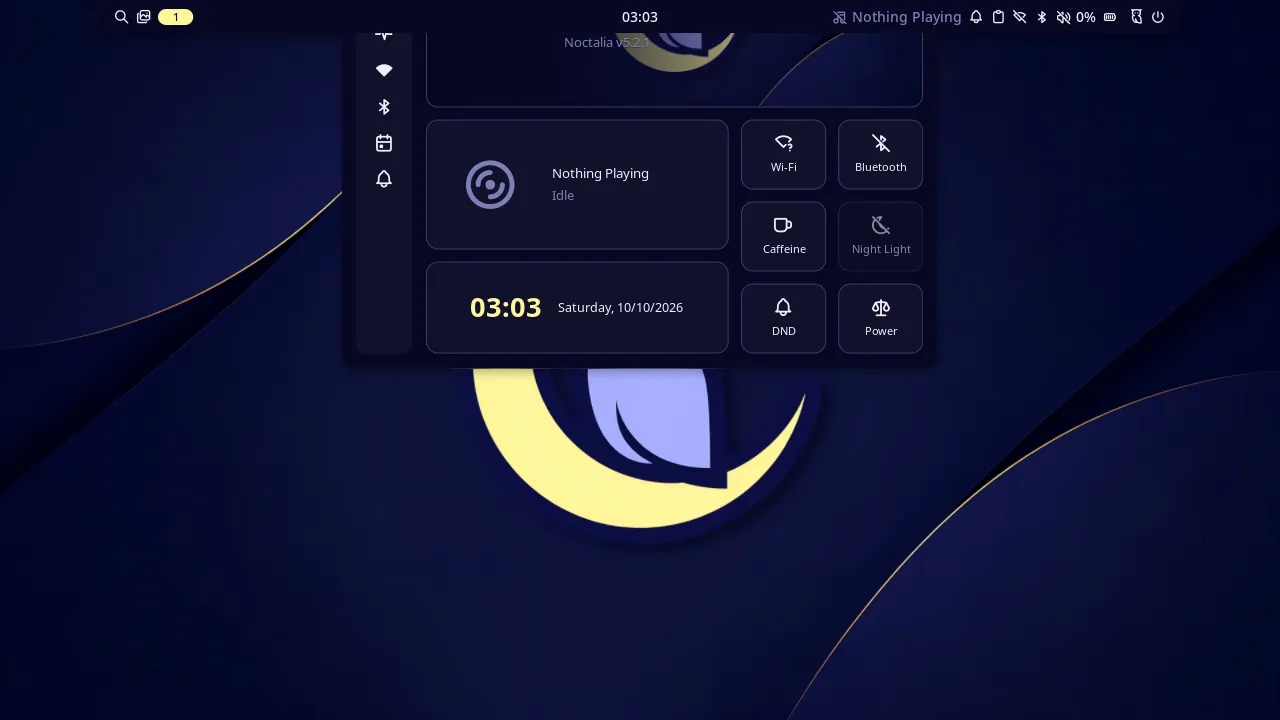
Noctalia’s control center, opened by shell_panel in a headless nested niri during the test suite. The server reported {"accepted":true,"focused_window":null,"observed":"opened","shell":{"active_panel":"control-center"}} 302 ms after the call: Noctalia reported the panel open within about 50 ms, and the change report then waited until niri had been quiet for 250 ms.
shell_panel sends panel-open, or panel-close with open: false, then reads Noctalia’s status every 100 ms for up to two seconds:
observed |
Means |
|---|---|
opened |
activePanelId is the panel |
closed |
(closing) it isn’t any more |
timeout |
neither happened within two seconds |
uncertain |
Noctalia’s reply, or a later status, was lost, or a stop or a lost lease cut the call short once the command went out |
When the panel is already open, or already closed, nothing is sent and accepted is false. The result has shell.active_panel, the open panel when the observation ended.
An open panel holds keyboard focus, so focused_window is null while it is open. Type into it with expect: "none".
Any command
Section titled “Any command”With unrestricted on, the noctalia tool sends any Noctalia command, the way noctalia msg does:
| Argument | Value |
|---|---|
args (required) |
1 to 64 strings: the command and its arguments, as after noctalia msg. A string holding U+001E, which frames Noctalia’s message, or a line break is an argument mistake, and nothing is sent |
The server joins args with spaces and sends them over the same socket, with the same two-second deadline, as noctalia msg does. Noctalia’s notification-show is the one command noctalia msg rewrites (as JSON) before sending; send that JSON yourself. observed is sent and noctalia holds Noctalia’s answer:
| Field | Value |
|---|---|
reply |
what noctalia msg would print, cut at 64 KiB |
truncated |
whether it was cut |
It reaches every command noctalia msg does, not only panels and plugins. Noctalia 5.2.1’s include session logout, reboot, shutdown, suspend and lock-and-suspend; dpms-off; screenshot-fullscreen and screenshot-region, which write files and the clipboard; clipboard-copy and clipboard-clear, which replace or empty your clipboard with no restore and no secret hint, unlike a paste through type_text; config-reload, log-level-set and plugins; and opening any panel, the launcher, the session menu and the clipboard history among them. It has no unlock command, so the tool can’t get past screen_locked.
A reply starting error:, which makes noctalia msg exit 1, comes back as upstream_error with Noctalia’s text, such as Noctalia replied: error: unknown command (try: noctalia msg --help). A lost reply is uncertain: Noctalia acts before it answers. The tool needs the lease, stops at the stop key and is written to the audit log as the number of arguments and their lengths in bytes, never their text.
This is how an agent can start a screen recording with Noctalia’s OBS plugin, as a niri keybind would, since keybinds don’t fire from the keyboard tools:
{"args": ["plugin", "ayagmar/obs-control:controller", "all", "toggle-record"]}Paste and clipboard history
Section titled “Paste and clipboard history”A paste through type_text marks the text it puts on the clipboard with x-kde-passwordManagerHint: secret, so clipboard managers that honour the hint, Noctalia’s among them, keep it out of their history. See Pasting.