
5-hour blocks
Subscription plans such as Claude Max and ChatGPT Pro meter usage in rolling windows of about five hours. llm-usage blocks estimates those windows from your logs, one chain per source, and shows how much each window used and how fast the current one is burning. On a pay-as-you-go API key the blocks mean nothing; use Usage totals instead.
llm-usage blocksllm-usage blocks --source claude --last 1How blocks are placed
Section titled “How blocks are placed”A block starts at the UTC hour of a source’s first event and lasts five hours. The next event of that source at or after the block’s end starts the next block. Each source has its own chain, so Claude Code and Codex blocks overlap freely, and one source’s chain spans all your machines, since the provider counts the account, not the computer.
These are estimates. Providers do not write their windows into the logs, and the CLI marks every block report as estimated. A block’s start can be off when usage on a day the CLI did not read began the chain earlier; JSON marks such blocks startUncertain: true.
Read the report
Section titled “Read the report”The table has one row per block, in time order: the block’s start and end in the reporting timezone, the source, models, events, the token columns, and cost. The block that contains the current time is marked (active). Under the table, each active block gets a line:
Active block (estimated), claude: ends 2026-06-21 15:00, 180 min left, burn rate $0.02/h, 13,100 tokens/h.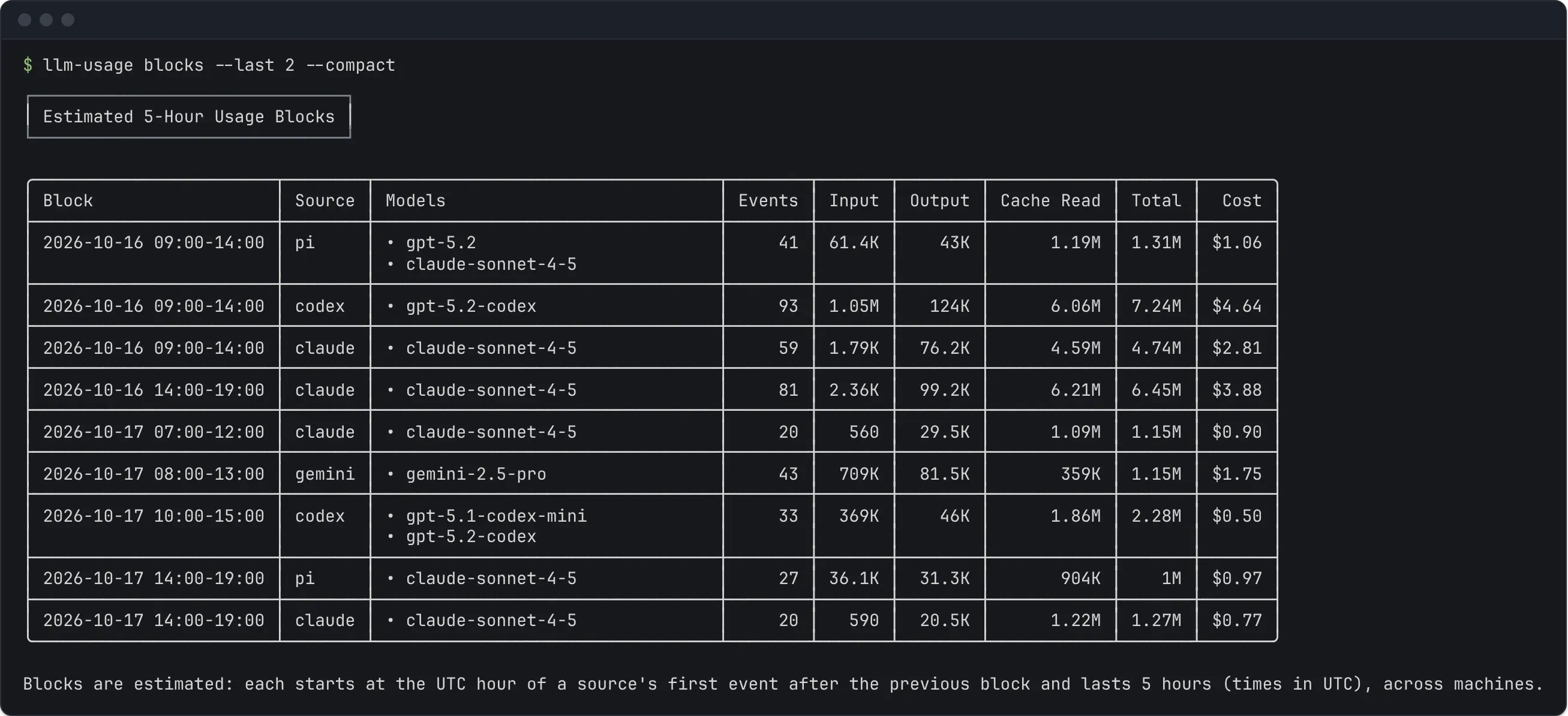
The burn rate is the block’s usage so far divided by the time since it started (at least one minute). When some events in the block have no price, the cost rate is a lower bound.
On a narrow terminal each block is listed as labelled values instead of a table row, and --compact abbreviates token counts and leaves out minor columns.
Set the window
Section titled “Set the window”Without date flags, blocks covers the last 7 days, counting today. --last N covers the last N days, --since and --until take inclusive dates, and --all reports every block. --last cannot be combined with the other three, and --all cannot be combined with dates.
llm-usage blocks --last 2llm-usage blocks --since 2026-06-01 --until 2026-06-07llm-usage blocks --all --top 5 --jsonTo find where a block running into the window started, the CLI also reads the 7 days before it. A block that ends at or before the start of the window is left out; one that started earlier and runs into the window is kept whole. A window that ended before today has no active block.
--top N keeps the N largest blocks across all sources, ranked by cost, or by tokens when any block’s cost is incomplete or with --no-cost.
Filters keep the account’s windows
Section titled “Filters keep the account’s windows”Your plan’s window runs on all of a source’s usage, whatever project or model it was for. So --repo, --model, and --provider do not move the blocks: the CLI places them from the source’s whole stream, then counts only the usage that matches the filter. Blocks with no matching usage are left out.
llm-usage blocks --repo apillm-usage blocks --source claude --model opus--machine works the same way. The blocks are placed from every configured machine’s usage, read from the cached copies without refreshing them over ssh, and only the machines you name are counted. A machine whose cache cannot be read shows a warning starting with Account window (blocks across every machine):, since the windows were placed without it.
--source does narrow the chains, since each source is its own chain.
Output
Section titled “Output”blocks supports terminal, --json, and --markdown output, but not --share; the interactive report has a 5-hour blocks chart. --no-cost leaves cost out of the table.
{ "schemaVersion": 1, "report": "blocks", "data": { "estimated": true, "blockHours": 5, "timezone": "UTC", "since": "2026-06-15", "until": null, "top": null, "blockCount": 8, "blocks": [ { "source": "claude", "start": "2026-06-21T10:00:00.000Z", "end": "2026-06-21T15:00:00.000Z", "startUncertain": false, "firstEventAt": "2026-06-21T10:15:00.000Z", "lastEventAt": "2026-06-21T10:15:00.000Z", "eventCount": 1, "inputTokens": 5000, "outputTokens": 1200, "reasoningTokens": 0, "cacheReadTokens": 20000, "cacheWriteTokens": 0, "totalTokens": 26200, "costUsd": 0.039, "models": ["claude-sonnet-4-5"], "modelBreakdown": [ { "model": "claude-sonnet-4-5", "inputTokens": 5000, "outputTokens": 1200, "reasoningTokens": 0, "cacheReadTokens": 20000, "cacheWriteTokens": 0, "totalTokens": 26200, "costUsd": 0.039 } ], "active": { "remainingMinutes": 180, "tokensPerHour": 13100, "costUsdPerHour": 0.0195 } } ], "activeBlocks": [] }}The sample keeps one of the eight blocks and leaves activeBlocks empty to save space. blocks holds the shown blocks, in time order or by rank with --top; blockCount counts the window’s blocks before --top. activeBlocks repeats the blocks that contain the current time, whether or not --top shows them. active is null on every other block. The full contract is report-blocks.v1.schema.json.