
Usage Totals
Use hourly, daily, weekly, and monthly to group matching usage by period and source. These commands differ in their time buckets; they share filters, pricing, and output formats.
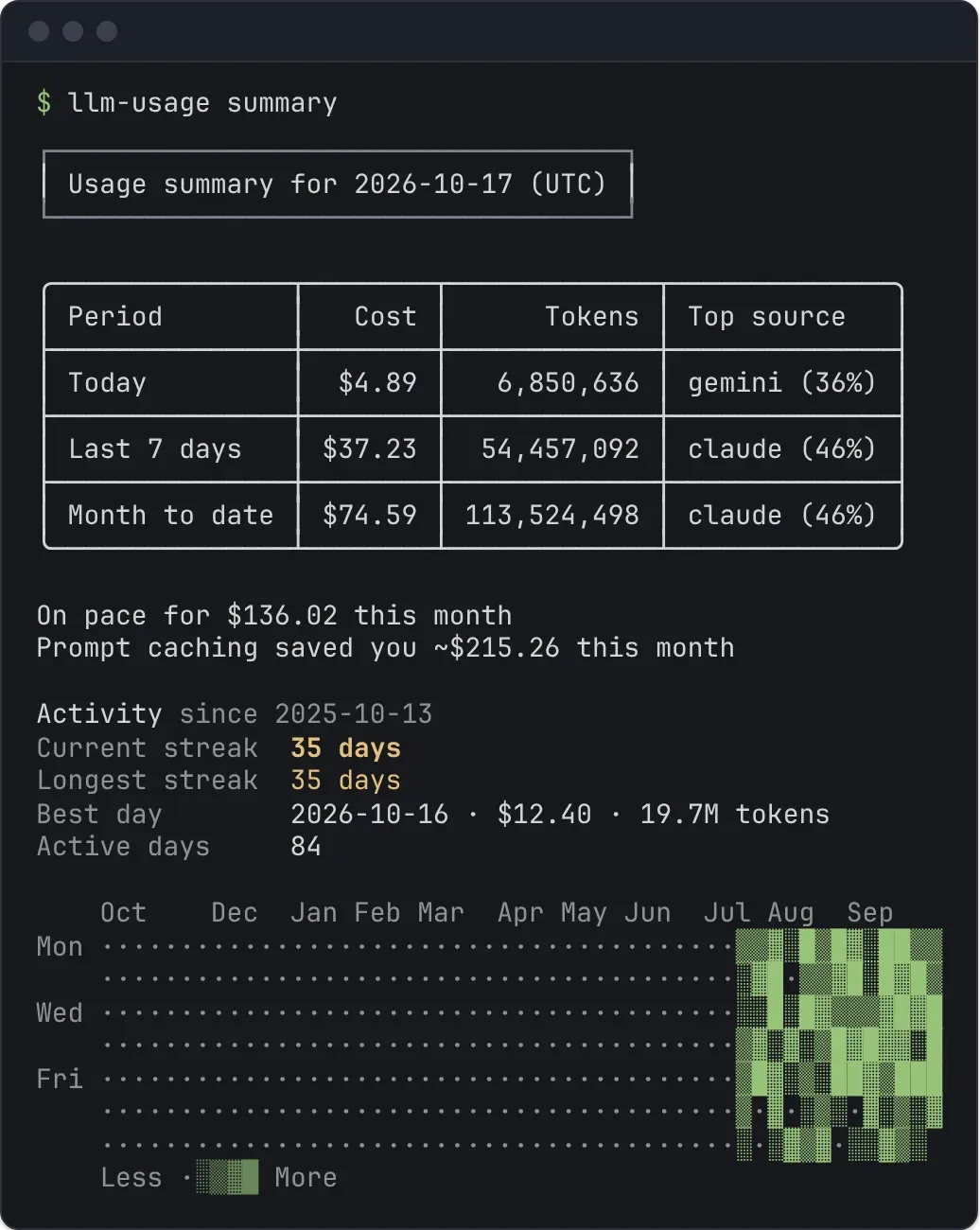
llm-usage hourlyllm-usage dailyllm-usage weeklyllm-usage monthlyRun llm-usage with no command for a short summary: cost, tokens, and the top source for today, the last 7 days, and month to date. It accepts the same source, provider, model, project, timezone, pricing, and output flags, but no date flags: llm-usage summary --since 2026-01-01 fails and points you to daily.
Under the table, from the third day of the month, the summary projects the month: month-to-date cost divided by the days so far, times the days in the month (“On pace for $X this month”). Set monthlyBudgetUsd in the config file to compare against a budget: the summary says when you are within it, warns when the projection exceeds it, and warns when month-to-date spending already has. The budget covers all your usage, so a run narrowed with --source, --provider, or --model shows the projection without the budget; a sources list in the config file keeps it. It also estimates what prompt caching saved this month: cache-read tokens priced at each model’s input rate minus its cache-read rate. --json carries these under monthEnd and monthToDateCacheSavingsUsd. When this month counts usage from more than one machine, it also splits the month’s cost by machine (by tokens when the cost is unknown), and --json lists each period’s machines under machines. Each period in --json also carries previous: the totals of the window it is set against (yesterday for today, the 7 days before the last 7 days, and for month to date the same days of the previous month, as compare picks them), which the share page sets against this period.
When a day of the last 7 cost at least $1 and at least 3 times your median active day, the summary names it in a note under the table: the day, its cost, how many times the median it was, and the project and model with the largest share of its cost. The median covers the days with a cost among the 28 before that day; with fewer than 3 such days there is nothing to compare with, and no note. With several spike days it names the costliest. --json carries it under spike, with the median as medianActiveDayUsd.
Below that, the summary shows your activity over the past year: the current streak, the longest streak, the best day (most tokens), the number of active days, and a heatmap with one column per week and one row per weekday. A streak counts consecutive local days with usage in your reporting timezone; today without usage yet does not break it. The year starts on the Monday 52 weeks before the current week, and a narrow terminal keeps only the most recent weeks that fit. --json carries the same data under activity, including every day with its intensity level.
Set the reporting window
Section titled “Set the reporting window”Without date bounds, hourly covers today, daily covers the last 7 days and weekly covers the last 8 weeks (from the Monday 7 weeks before the current week), both in your reporting timezone. Each prints a reminder on stderr; --all includes every period and cannot be combined with --since or --until. monthly includes all matching discovered history and does not limit the result to the current month; it accepts --all, which changes nothing.
llm-usage daily --allllm-usage weekly --allllm-usage monthly --since 2026-09-01 --until 2026-09-30--last N covers the last N days, weeks, or months, counting the current one: daily --last 1 is today, weekly --last 1 is this week, and monthly --last 3 is this month and the two before it. For hourly, N counts days and goes up to 31. The window ends today, so usage dated later (from a clock set ahead) is left out. It cannot be combined with --since, --until, or --all.
llm-usage weekly --last 1llm-usage monthly --last 3--since and --until use inclusive calendar dates in the reporting timezone. Set --timezone to keep boundaries consistent across machines:
llm-usage daily --timezone UTC --since 2026-09-01 --until 2026-09-07Hour by hour
Section titled “Hour by hour”llm-usage hourly --last 3llm-usage hourly --since 2026-06-15 --until 2026-06-15 --by-repohourly labels each row with the local hour it starts (2026-06-15 09:00) in the reporting timezone and prints a reminder on stderr when it shows today by default. --all reports every hour since the first usage. It has no --share. When the clocks go back at the end of daylight saving time, one local hour happens twice; its row covers both, a note on stderr names it, and the JSON row carries repeatedHour: true.
Use Compare when you want a current-versus-baseline comparison instead of a sequence of period totals.
Narrow the scope
Section titled “Narrow the scope”# Tool that wrote the sessionllm-usage monthly --source codex,claude
# Normalized billing providerllm-usage monthly --provider openai
# Model name or substringllm-usage monthly --model codexSource and provider are different: a Codex event can have source=codex and provider=openai. Model filters use an exact match when one exists after source, provider, and date filtering; otherwise they use substring matching.
A filter that cannot match prints a warning on stderr, with a suggestion for a likely typo: a --model or --provider value that appears in no usage within the report’s dates (--model claude-opsu-5-5 matched no usage in this date range (did you mean claude-opus-5-5?)), or a --source that has no files. A sources list in the config file never warns. An unknown --source id is an error that also suggests the closest id.
--repo keeps the usage of some projects only. A path (absolute, or starting with ./, ../, or ~/) matches that project and the projects under it; a name or path tail such as api or work/api matches the end of a project’s path; (unattributed) matches usage without one. Projects explains where a project comes from. --machine counts only the machines you name (local is this one).
llm-usage monthly --repo work/apillm-usage daily --machine localFor custom session locations, use source path overrides. Save recurring defaults in Configuration.
Read the rows
Section titled “Read the rows”A period has a row for each contributing source. A combined row appears when multiple sources contribute to that period. The final ALL row totals the full filtered range.
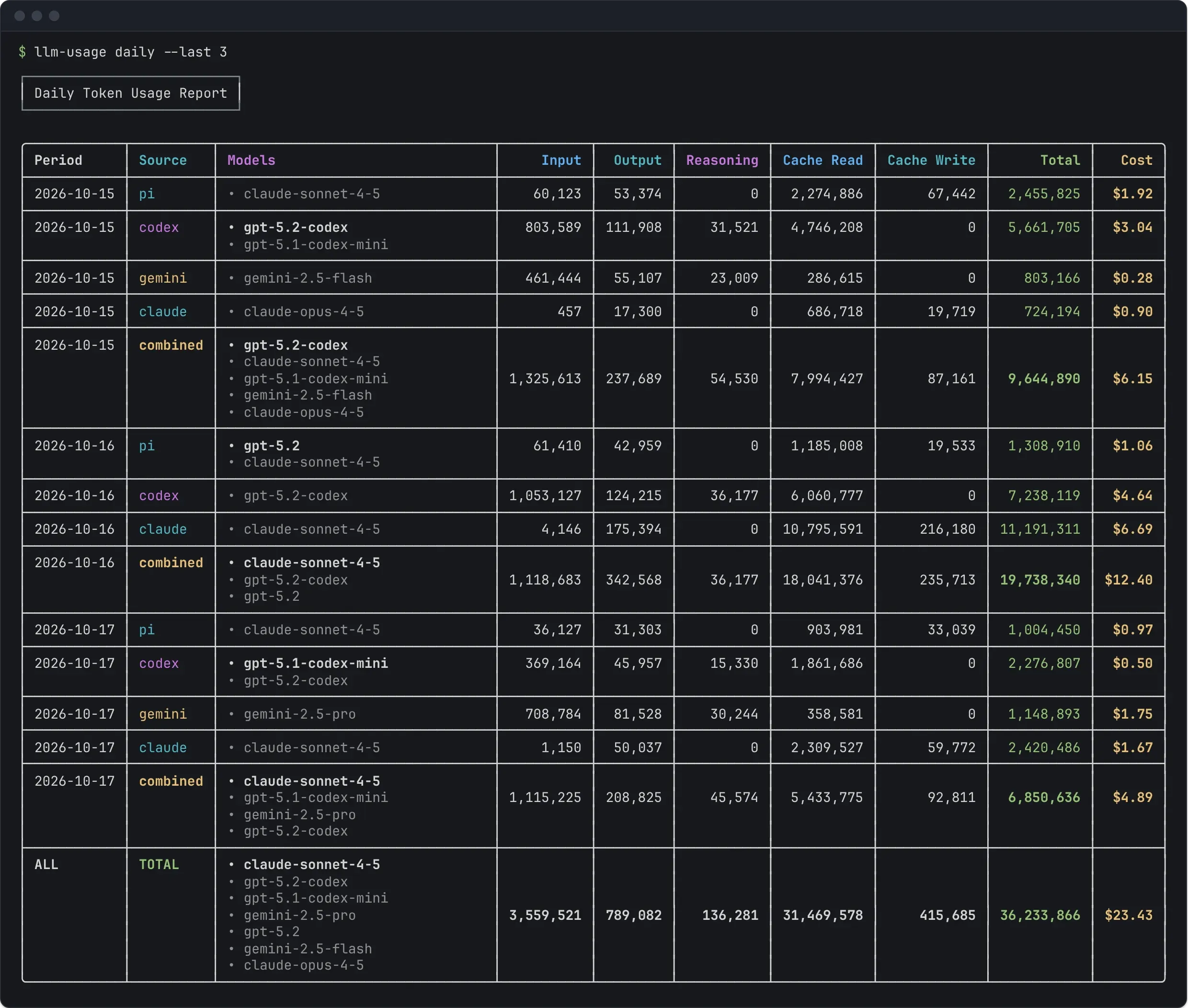
--by-repo splits each source row by project (claude · api), and --by-machine by the machine the usage came from; the two can be combined. In --json, the split rows carry repoRoot and machine.
Token columns preserve the normalized buckets provided by each adapter: input, output, reasoning, cache read, cache write, and total. Reasoning can be included in output for some sources, so adding every displayed bucket is not a reliable way to reconstruct total tokens. Check the source guide for token semantics.
Cost is in USD:
| Display | Meaning |
|---|---|
$12.34 |
Every contributing event has resolved cost. |
~$12.34 |
Only some contributing events have resolved cost. |
- |
No contributing event has resolved cost. |
A resolved cost may be source-recorded or estimated. It is not a guarantee that the amount matches your invoice. Pricing explains rate matching, offline mode, and overrides.
Inspect model breakdowns
Section titled “Inspect model breakdowns”llm-usage monthly --per-model-columnsThis expands metrics into aligned multiline cells ranked by each model’s total tokens within the row. It works with terminal and Markdown output.
Fit narrow terminals
Section titled “Fit narrow terminals”Tables shrink to the terminal width: token counts are abbreviated first, then less-used columns are hidden, and a note on stderr says what was left out. On a terminal too narrow for any table, such as a phone, each row is listed as labelled values instead. --compact asks for the short table directly; see Output formats. Use Session usage when you need conversations or repositories instead of time buckets.
Export or share
Section titled “Export or share”llm-usage monthly --json > usage.jsonllm-usage monthly --markdown > usage.mdllm-usage monthly --shareJSON uses the usage report envelope for all four granularities. --share writes an interactive usage-monthly-share.html report to the current directory, opens it in your browser, and still prints the normal report; daily and weekly write usage-daily-share.html and usage-weekly-share.html. llm-usage summary --share writes summary-share.html, which opens on the past 53 weeks. hourly has no --share; the share report has its own hour view. See Interactive report for what the page offers and Output formats for contracts and diagnostics.
Retained history
Section titled “Retained history”Reports include retained events from files that have left the disk, with moved or copied files suppressed to avoid duplicate history. A History: line on stderr says how many departed files it added, when there are any. Leave them out with --no-history:
llm-usage monthly --no-historyHistory needs the event ledger. When the ledger is disabled or cannot be opened, reports run without it; pass --history to fail instead. A source pointed at a custom directory (--codex-dir ./export, --source-dir) gets no history unless you pass --history, so departed files never leak into a report scoped elsewhere. The reverse holds too: a file only ever read through a directory flag never shows up as history in a report on the usual location, even after the export is deleted. Directories set in config.toml or through variables such as CODEX_HOME are the usual location. Files an older version stored from a custom directory still count as history once they are gone. llm-usage prune --departed-before can remove them, but it selects every departed file older than the date, including real history, so preview without --apply and check the listed paths first. Read Caching and history before deleting the ledger or pruning retained events.