
Session Report
llm-usage session lists usage per conversation (session) rather than per calendar period, so you can find your most expensive or most active sessions and where they ran.
Command structure
Section titled “Command structure”llm-usage session [options]Examples:
llm-usage sessionllm-usage session --top 50llm-usage session --top 0llm-usage session --id 486c3261llm-usage session --id 486c3261 --timelinellm-usage session --by-repollm-usage session --source codex --jsonllm-usage session --markdownOptions
Section titled “Options”--top <n>: how many rows to show, ranked by cost (default 20;--top 0shows all)--id <session-id>: keep only sessions whose id contains the value (case-insensitive; repeatable or comma-separated); cannot be combined with--by-repo--by-repo: aggregate sessions into one row per project--timeline: with--idnaming one session, list that session request by request (see Timeline); cannot be combined with--top--repo <project>: count only some projects, as described on Projects- shared filters apply:
--source,--provider,--model,--machine,--since,--until,--timezone, source-path overrides, pricing flags, and--no-history
Without date flags, session covers your full history. It supports terminal, --json, and --markdown output, but not --share; the interactive report lists each project’s sessions without their ids.
Output
Section titled “Output”The terminal report is a boxed Session Usage Report table with Session, Source, Project, Last Activity, Duration, Total, Cost, and Models columns, sorted by cost. Project uses the same labels as llm-usage projects: the repository’s folder name, with parent folders added when two repositories share it, and (unattributed) for sessions without one. Duration is the raw span from a session’s first to last event (- for single-event sessions). Sessions have no TOTAL row because each row is a conversation, not a calendar period. When the list is truncated, a note is printed on stderr:
Showing top 20 of 1653 sessions by cost. Use --top 0 for all.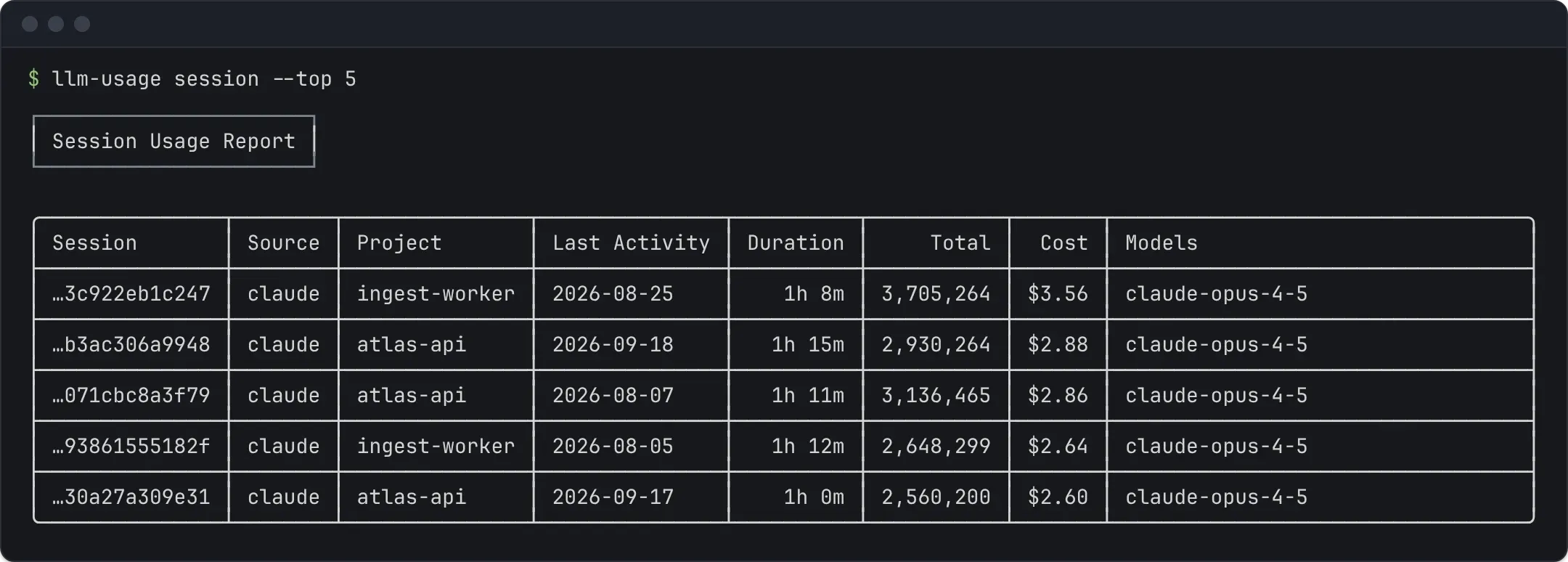
--by-repo replaces the per-session rows with one row per project, the working directory the tool recorded (Project, Sessions, Last Activity, Total, Cost, Sources). Sessions without a recorded directory are grouped under (unattributed).
Timeline
Section titled “Timeline”--id <session-id> --timeline shows one session in time order: each request with its time of day (the date heads the table, and a row on a later day shows its date), model, input, cache read, cache write and output tokens, its cost, and the running total of the session’s cost so far. It answers “why did this session cost $12”: the running total shows where the cost climbed, and the requests around it show what the model was doing.
The --id value must match exactly one session in the window. When it matches several and one of them has exactly that id, the timeline shows that one. Otherwise the error lists up to 10 of them with their source and last-activity date, so you can pass more of the id or pick the source:
--timeline needs exactly one session, but --id 486c matches 2: codex 486c3261-d87e-4971-8813-904c9e5a9009 2026-03-05 claude 486c77aa-0f12-4c55-9a1e-6b2d0e3f4a10 2026-02-11Pass more of the session id to --id, or narrow with --source.Requests come from the same data as every other report, history included. Between them, the timeline shows the session’s tool calls and its user and assistant turns (Claude Code, Codex and pi log them; other sources show requests only). They come from the event store, or from the session file with the store off. The store keeps a turn’s role, ids, model and text length, never its text. A departed file that history serves keeps its tool calls and turns. Another machine’s session has them from its last sync, once that machine runs this version too, and a note on stderr says what was read. A resumed or forked session can copy its parent’s history: copied tool calls stay with the parent, as tools counts them, but copied turns carry no id to match them by, so they show in both sessions. To match those copies, the timeline reads the tool calls of every file of the session’s source in the window; with the store off, that reads every one of those files from disk, which on large logs takes a few seconds. The terminal and Markdown tables fold everything between two requests into one line, such as 1 user turn · 12 tool calls: Bash ×7, Read ×5, 1 error. No rows are cut: a long session prints every request.
JSON shape
Section titled “JSON shape”Default --json returns an array of session rows under data:
{ "schemaVersion": 1, "report": "session", "data": [ { "rowType": "session", "source": "codex", "sessionId": "486c3261-d87e-4971-8813-904c9e5a9009", "repoRoot": "/path/to/repo", "firstActivity": "2026-03-05T10:00:00.000Z", "lastActivity": "2026-03-05T11:30:00.000Z", "durationMs": 5400000, "activeMs": 2700000, "eventCount": 42, "models": ["gpt-5.1"], "inputTokens": 120000, "outputTokens": 8000, "reasoningTokens": 0, "cacheReadTokens": 40000, "cacheWriteTokens": 0, "totalTokens": 168000, "costUsd": 1.23, "costEstimatedUsd": 1.23, "filePaths": [ "/home/me/.codex/sessions/2026/03/05/rollout-2026-03-05T10-00-00-486c3261-d87e-4971-8813-904c9e5a9009.jsonl" ], "toolCalls": 57, "toolErrors": 2 } ]}durationMs is the raw span: lastActivity minus firstActivity; it over-counts idle time by design. activeMs estimates activity from event timing: the sum of inter-event gaps, each capped at 5 minutes, so a session left open overnight contributes at most 5 idle minutes per gap. Single-event sessions get activeMs: 0. This is an event-gap estimate, not a measurement of human working time.
repoRoot is omitted when the session has no project.
costExplicitUsd and costEstimatedUsd split costUsd into the cost the source logged and the cost priced from tokens; each is omitted when no event of that kind has a cost.
Session rows in --json also carry what the tables leave out:
filePaths: the absolute paths of the local files this run counted whose stored usage carries the session id, departed files included. The list is not narrowed to the date window. It comes from the event store, so it is omitted with the store off and for a session only another machine logged; a file the store could not fingerprint is left out.toolCallsandtoolErrors: the session’s tool calls in the date window, and those whose result records an error, deduplicated astoolsdeduplicates them: a call a resumed or forked session copied counts once, for the session whose file is read first. They come from the event store, or from the session files with the store off, which on large logs takes a few seconds, and only Claude Code, Codex and pi log them: sessions of other sources have neither field. Neither is there for a source whose files, or another machine’s cache, could not be read, so a failed read never shows as 0; a warning onstderrnames the failed reads, and a note says where the calls came from, astoolsdoes. Another machine’s sessions get them from its last sync: until that machine syncs from this version, they count 0.
--by-repo --json returns an array of repo rows (rowType: "repo", repoRoot, sessionCount, firstActivity, lastActivity, sources, and the same token and cost totals). The (unattributed) row has no repoRoot. --timeline --json returns an object under data: session, the matched session row with the same fields, and rows in time order. Each row has a kind: usage rows carry timestamp, model, the token buckets, costUsd, runningCostUsd, and runningCostIncomplete when this or an earlier request has no price; tool_call rows carry timestamp, name and status (ok, error, or unknown when the file has no result); message rows carry timestamp and role, never the text. JSON rows are not folded.
The full contract is report-session.v1.schema.json.