
Instructions
The Instructions section lists every instruction file that applies to the open directory, in the order Claude Code loads it.
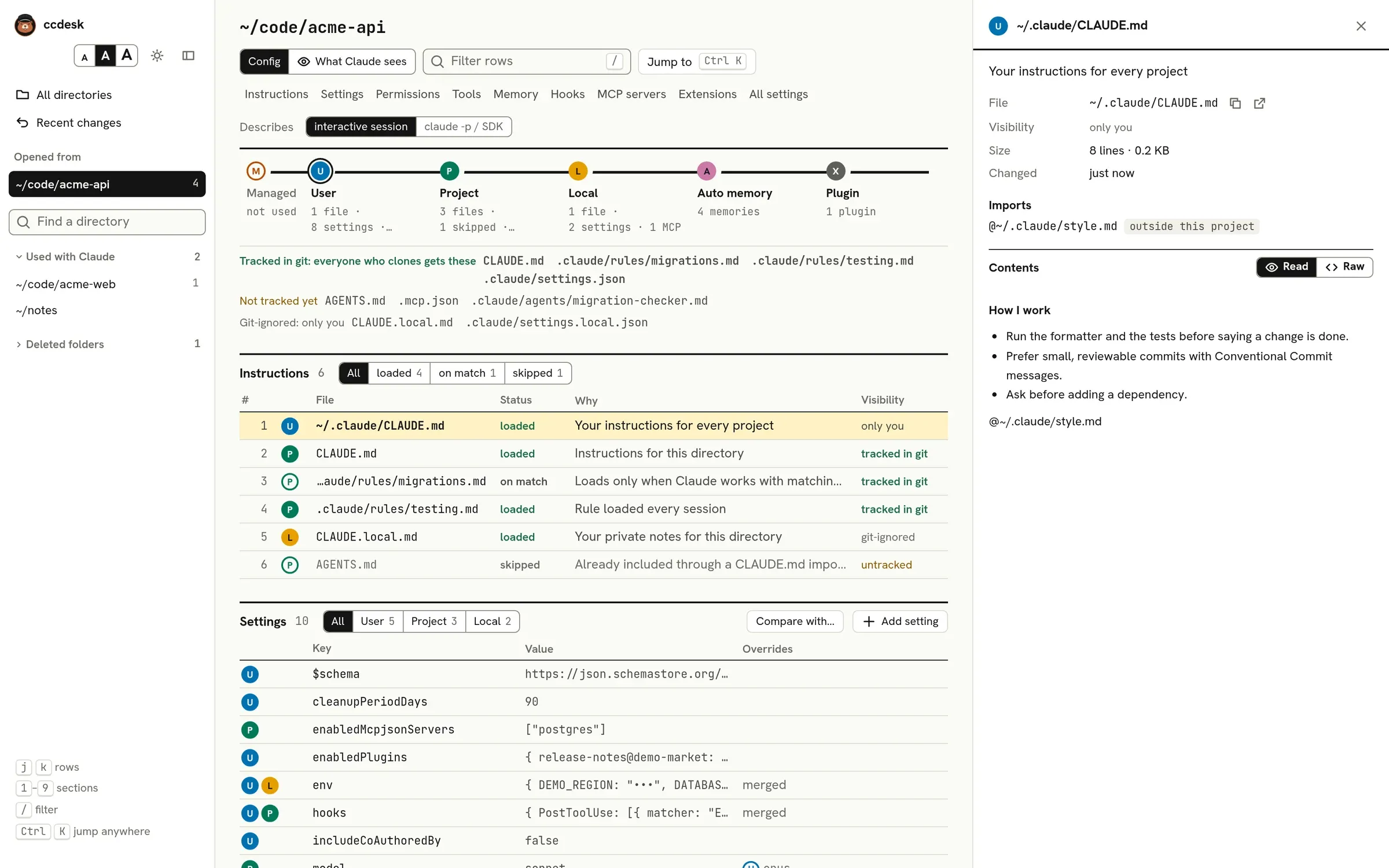
Load order
Section titled “Load order”- The managed
CLAUDE.mdin your organisation’s managed folder, theclaudeMdkey of managed settings, then every.mdfile under the managed folder’s.claude/rules/. ~/.claude/CLAUDE.md, then every.mdfile under~/.claude/rules/.- For each folder from the top of the filesystem down to the open directory:
CLAUDE.md,.claude/CLAUDE.md, the.mdfiles under.claude/rules/,CLAUDE.local.md,AGENTS.mdand.claude/AGENTS.md.
Rule folders are searched in subfolders too. Instruction files in folders below the open directory load only when Claude works with a file there; use When Claude touches a file to see them.
Status
Section titled “Status”Each file has one of three statuses:
- loaded: in context from the start of every session here.
- on match: a rule with a
pathsfield in its frontmatter. It loads only when Claude reads or edits a file that matches. A rule whosepathsonly match everything, such as**, loads every session instead, as Claude Code treats it like one without the field. ccdesk matchespathsthe way Claude Code 2.1.296 does, with.gitignorerules, and in places that differs from the docs’ table: a pattern without a slash matches at any depth, so*.mdmatchesdocs/guide.mdand not only Markdown files in the project root;**matches folders whose names start with a dot; case does not count; andsrc/**matches asrcfolder at any depth. A project rule’s patterns are read from the folder holding its.claude, and those of your own and managed rules from the directory the session starts in. - skipped: present, but Claude Code does not load it. The Why column says which rule applies.
A file is skipped when:
- it is an
AGENTS.md, and aCLAUDE.mdorCLAUDE.local.mdexists in any folder from the top of the filesystem down to the open directory (~/.claude/CLAUDE.mddoes not count), or aCLAUDE.mdalready imports it or links to it; - it is a
CLAUDE.md,.claude/CLAUDE.md, rule orCLAUDE.local.mdat the filesystem root, such as/CLAUDE.mdorC:\CLAUDE.md, where Claude Code does not look; - it is a file that loaded earlier, reached again under another name through a link, such as a
.claude/CLAUDE.mdthat links toCLAUDE.md; - your
claudeMdExcludessetting matches its path, or for a link, its target’s. As in Claude Code,*and**also match folders whose names start with a dot, such as.claude, and a glob written through a linked folder matches the files it leads to, except on Windows for a glob that starts with a drive letter, where Claude Code does not follow the link either; - it is larger than 4 MiB, which Claude Code does not load, managed files included;
- a plugin setting limits instruction files to
CLAUDE.mdonly, or to managed files only. Managed-only keeps the managed folder’s rules as well as itsCLAUDE.md: Claude Code 2.1.296 drops only user, project and local files, though its docs name only the managedCLAUDE.md; - it is an
AGENTS.md, and anenabledPluginsentry in any settings file turns off the built-in plugin that reads it (cc-plugin-agents-md@builtin, oragents-md@builtinbefore v2.1.285), as/plugindoes. For this plugin, any value buttrueturns it off. Claude Code then readsCLAUDE.mdfiles only, and the managed-only setting does not apply either; - it is a project or local rule that links to a file outside the project, and you have not approved imports from outside the project;
- the open directory is a git worktree inside its main checkout, such as one in
.claude/worktrees, and the file is aCLAUDE.md,.claude/CLAUDE.mdor rule of a main checkout folder above it. Claude Code reads the worktree’s own copies instead; the main checkout’sCLAUDE.local.mdstill loads.
Imports
Section titled “Imports”A file can pull in others with @path/to/file lines. ccdesk follows them the way Claude Code does: after the frontmatter, outside code blocks, inline code and HTML comments, relative to the importing file, ~/ for your home folder, up to four levels deep. A # and what follows it are left out, so @docs/guide.md#setup imports docs/guide.md, but punctuation is not: @README.md. names a file called README.md.. The inspector lists each file’s imports and marks the ones that are missing, larger than 4 MiB, outside the project, or waiting for your approval, and the ones Claude Code does not load because they are not text files, such as images, or because claudeMdExcludes matches them.
Imports from your user or managed files load without asking. Imports in project or local files that point outside the project wait until you accept Claude Code’s prompt for external imports, which it records in ~/.claude.json.
Who sees each file
Section titled “Who sees each file”The Visibility column says who else gets the file:
- tracked in git: everyone who clones the repository;
- untracked: only you for now, until it is committed;
- git-ignored: only you;
- only you: a file in your own
~/.claude; - organisation: a managed file.
A file that is a link into ~/.agents is marked, because other coding agents that read ~/.agents share it.
Health checks
Section titled “Health checks”ccdesk flags three things on instruction files that load, with a count after the file’s name and the details in the inspector:
- the file is longer than 200 lines, which the Claude Code docs suggest staying under;
- a paragraph of 60 characters or more repeats one in an earlier file, so Claude reads it twice;
- an
@importpoints at a file that does not exist.
Instruction files that exist but cannot be read, for example because of their permissions or a link that loops, are listed at the top of the page, and so is a rules folder that links to a network location, which Claude Code does not follow. So are memory, subagent, skill and command files that cannot be read, and any of these that is not valid JSON: a settings file, ~/.claude.json, a .mcp.json, managed-mcp.json, and a plugin’s plugin.json or hooks/hooks.json. A missing file is not listed.
Editing
Section titled “Editing”ccdesk does not edit instruction files. Use the open button in the inspector to change one in your editor; the page picks up the change within a second.