
Memory
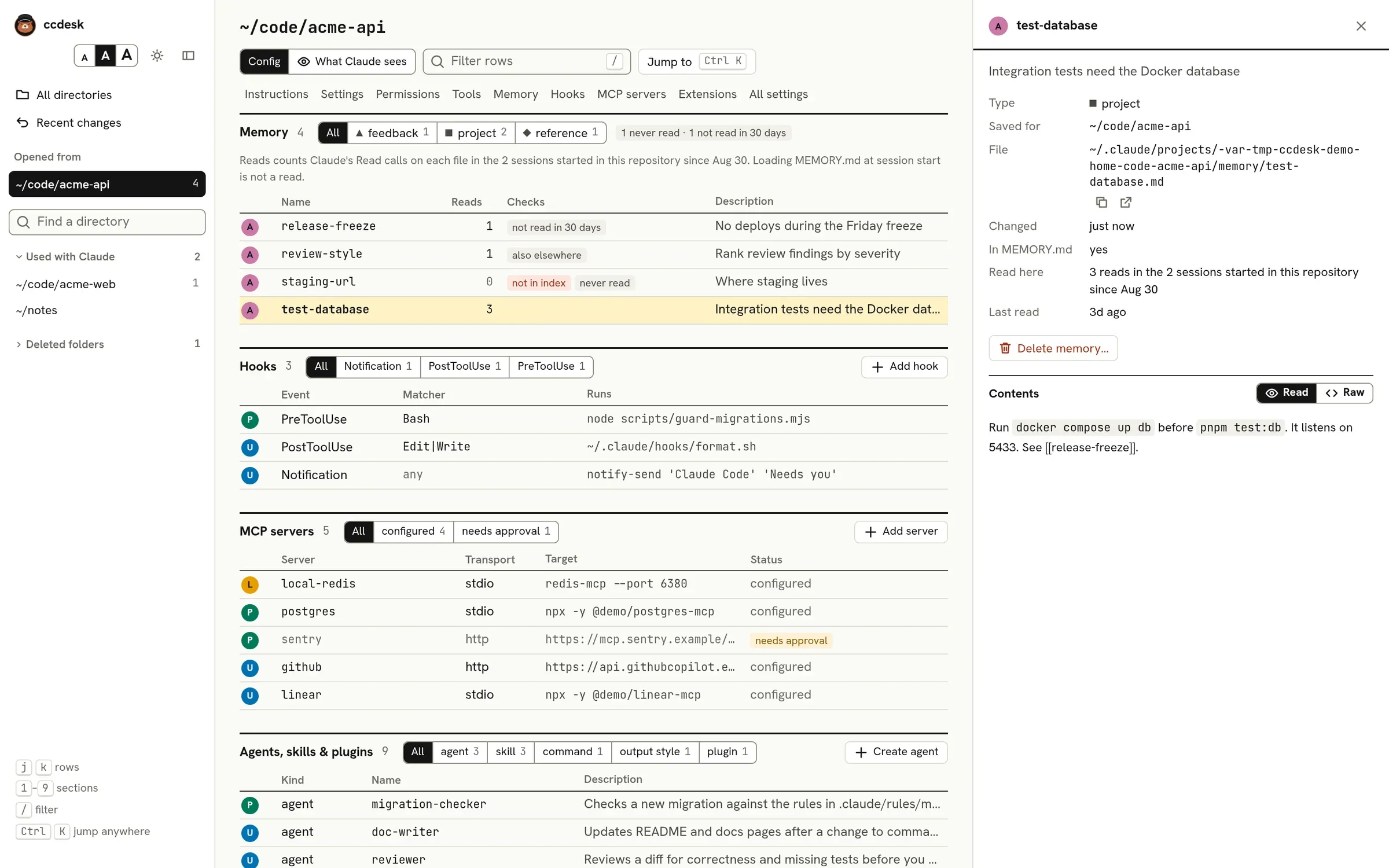
Claude Code’s auto memory is a folder of Markdown files per project, with a MEMORY.md index whose start loads into every session. The Memory section lists the memories for the open directory, with their type, description and how often Claude read them.
Where memory lives
Section titled “Where memory lives”By default the folder is ~/.claude/projects/<project path with every character other than letters and digits turned into ->/memory. When that name is longer than 200 characters, Claude Code keeps the first 200 and adds - and a short hash of the path, and ccdesk does the same. Every worktree and subfolder of a repository shares the main checkout’s folder. A submodule has its own, named after the submodule’s root, and the worktrees of a bare repository share one named after the bare repository’s folder itself, such as repo.git, as Claude Code 2.1.296 does. ccdesk also follows:
autoMemoryDirectory, an absolute path or one starting with~/. Set in a project or local file, it follows the trust rule for hooks: an interactive session uses it once you trust the folder or a parent folder covering it, and aclaude -por SDK run uses it at once. ccdesk shows a memory folder set this way but does not change it.CLAUDE_CODE_PROJECT_DIR_NAME, when you use it withCLAUDE_CONFIG_DIRand it is a name Claude Code accepts: 1 to 64 letters, digits,-or_, and not a Windows device name such ascon. Claude Code ignores any other value, and so does ccdesk.
Memory is off, and MEMORY.md drops out of What Claude sees, when CLAUDE_CODE_DISABLE_AUTO_MEMORY is 1 or true, or when autoMemoryEnabled is false and that variable is not set. The section says so.
Memories are filtered by their type frontmatter: user, feedback, project or reference, each with its own mark. A memory without one of these types is listed as unknown.
Checks
Section titled “Checks”- not in index: the memory is not linked from
MEMORY.md, so Claude only finds it by searching the folder. - broken links: a
[[link]]in the memory names no memory in this folder. - lines past … are not loaded:
MEMORY.mdis longer than the 200 lines or 25 KiB that load at session start. - index lines point at missing files:
MEMORY.mdlinks to files that are gone. - also elsewhere: a memory with the same name is saved for another directory. The inspector lists the copies and says whether their text is the same.
- never read and not read in 30 days: see Reads. These are observations, not faults.
Claude uses a memory by reading its file: only the index loads at session start, and Claude reads a memory file when it needs it. Reads counts the Read calls on each memory file in the transcripts, and Last read says when the latest one was; the inspector repeats both, under Read here and Last read. A file read in parts counts once per part. Loading MEMORY.md at session start is not a read, and neither are the earlier reads Claude Code replays into the context after a compaction, a Read you refused or one that failed, such as a Read of a memory before it was saved.
The sessions are those of Tool usage counts: in a git repository, every session started in it, in a subfolder or in a worktree, which all share one memory folder. A read counts when its path leads to the memory file, also through a link to the Claude folder, to the file a memory links to, or written with ~. A relative path is not counted.
A memory read by none of these sessions is flagged never read, and one whose last read is older than 30 days not read in 30 days; the section head says how many of each there are. Claude Code still loads the index line of such a memory every session, so if it no longer helps, deleting it frees that line. Claude Code deletes old transcripts after cleanupPeriodDays, so “never” means never in the sessions still on disk. The counts arrive a moment after the rest of the page; a ? means ccdesk could not finish reading the transcripts. The inspector shows when a memory last changed and the directory it is saved for, except for a folder that autoMemoryDirectory or CLAUDE_CODE_PROJECT_DIR_NAME sets, which every directory may share. When the table is narrow, such as beside the inspector, it leaves out Type and Last read and keeps the description.
Memory in other directories
Section titled “Memory in other directories”All directories has a table of every memory saved under more than one directory, and whether the copies match or have drifted apart.
All directories, the palette’s memory search and also elsewhere cover every memory folder ccdesk can tie to a directory. A folder is tied to the directory in ~/.claude.json it is named after, else to the directory its sessions ran in. Otherwise it is tied to a parent folder of one of these, when it holds memory and is named after that parent’s repository root, or after the parent itself outside git. So a repository where you only ran Claude Code in a subfolder is listed under its root, with no sessions and its memory count. A folder named after a subfolder of a repository, left from before git init at the root, is not listed, since Claude Code no longer uses it. Two paths can give one folder name, such as a/b and a-b, and Claude Code then uses one folder for both; ccdesk lists it once, under the path nearest a directory you used. A folder named after a main checkout that is no parent of any directory you used, such as when you only worked in a linked worktree kept outside the repository, is not listed. The worktree’s own page still shows its memories.
Fixing the index
Section titled “Fixing the index”A memory flagged not in index has a button to add its line to MEMORY.md. Lines that point at missing files have a button to remove them; a line that also points at a memory that is still there is kept, for you to edit by hand. Links with a title, in angle brackets or starting with ./ are read like plain ones. A line that also holds a link ccdesk cannot tie to one file in the folder is kept too: a reference link such as [note][ref], a path into another folder, or a web address. A link counts as missing only when its file is not there as the file system looks it up, so a percent-encoded name such as my%20note.md names my note.md, and on a file system that ignores case, a link that differs from the file’s name only in case still works. Each shows the exact change to MEMORY.md first, and is refused if the memory or the index changed after you reviewed it.
Deleting a memory
Section titled “Deleting a memory”Select a memory and press Delete memory…. ccdesk shows the change to both files: the memory is deleted and the MEMORY.md lines that point only at it, as a link or as [[name]], are removed. A line that also points at another memory, or holds a link ccdesk cannot tie to one file, is kept as it is. If other memories link to it, the confirmation says how many will have a broken link. The memory is backed up first, and the toast’s Undo or Recent changes puts back both the file and its index line.